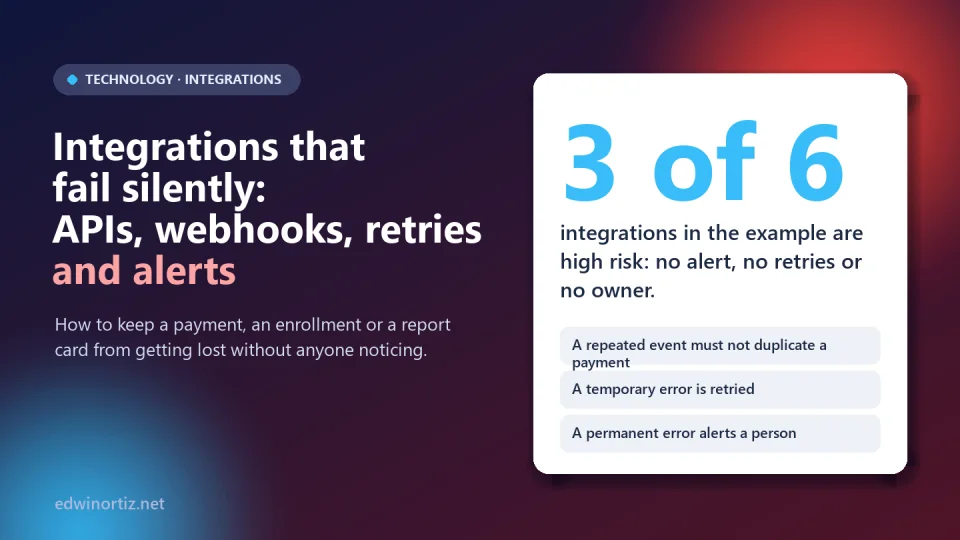
The worst failure in an integration is not the noisy one: it is the one that does not warn you. A confirmed payment that never reaches accounting, an enrollment that does not move from a form to the spreadsheet, a report card that is not emailed. Nobody sees an error on screen; the problem shows up weeks later, when a family complains or when the month-end close does not add up.
Today almost everything is connected to everything: the payment gateway to billing, the form to the academic platform, the store to email. Each connection (an API, a webhook, a scheduled file) is a point where information can be lost, duplicated or arrive late. This article explains how to design integrations that fail visibly, with a code example I ran, an integration inventory in Excel (in Spanish) and the Python demo. Sources verified on October 9, 2026.
Summary. A reliable integration does five things: it verifies where the message comes from, confirms quickly, does not duplicate even if the message arrives twice, retries temporary failures and alerts a person when something could not be processed. The rest is inventorying and assigning owners.
How they fail silently
Six typical ways, none with a visible error message:
- The destination was down for a while and the message was lost, because nobody retried.
- The message arrived twice and two payments or two enrollments were recorded.
- Messages arrived in a different order and a "paid" status was overwritten by an older one.
- A field changed in the provider's API and the integration keeps "working", but with empty data.
- A credential or certificate expired and from that day everything fails without warning.
- Whoever built it left and nobody knows it exists.
What a serious provider already warns you about
Stripe's webhook documentation, which I cite as an example of good practice (other providers have their own rules), says several things that apply to almost any integration: in live mode it retries delivery for up to three days with exponential backoff; the same event may arrive more than once and it recommends logging the IDs of events already processed; it does not guarantee delivery order; the endpoint must return 2xx quickly, before heavy logic, and process in a queue; and you must verify the signature of every message to avoid fake events.
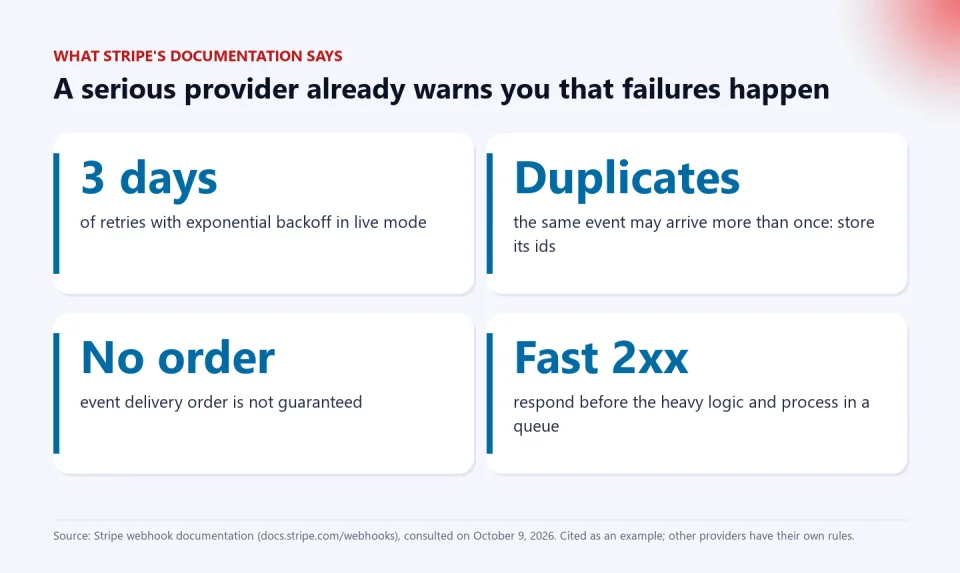
In plain terms: if your system depends on a message arriving only once, in order and without failures, it is badly designed, no matter who the provider is.
The flow in five steps
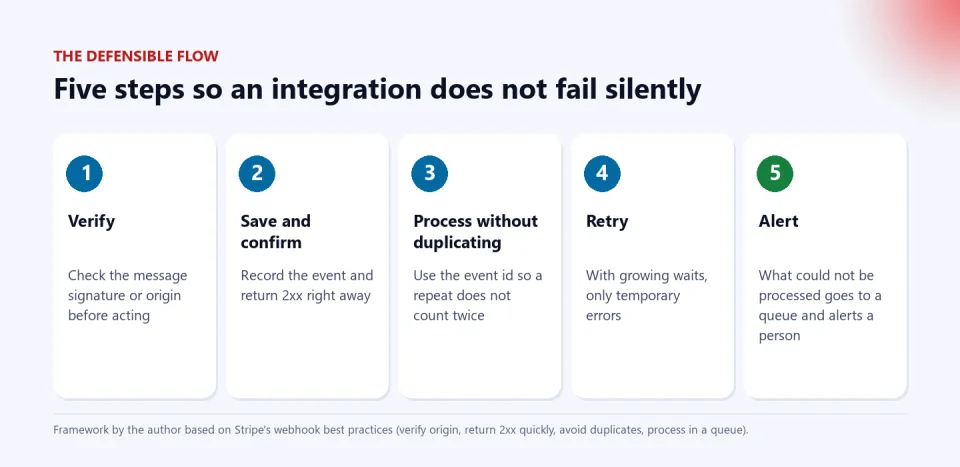
- Verify. Check the signature, shared secret or origin before acting. Without this, anyone could send a fake "payment confirmed".
- Save and confirm. Record the event and return 2xx immediately; if you do the heavy work before responding, the provider may consider the delivery failed and resend it.
- Process without duplicating (idempotency). Use the event identifier: if you have seen it, do not apply it again.
- Retry what is temporary. With growing waits and a bit of randomness, so you do not hit the destination all at once. Do not retry permanent errors (an order that does not exist will not exist tomorrow).
- Alert and keep what failed. What could not be processed goes to a queue and alerts a named person.
An executed example
I wrote a demo of about 90 lines in Python (standard library only) that simulates a provider sending six events: two repeated, one with a temporary accounting-system failure and one with a permanent error. These are the key parts:
def recibir(evento):
    """Punto de entrada del webhook: idempotente."""
    try:
        db.execute("INSERT INTO procesados VALUES (?,?)", (evento["id"], time.time()))
    except sqlite3.IntegrityError:
        print(f"{evento['id']}: duplicado, se ignora (ya procesado)")
        return
    con_reintentos(evento)

def con_reintentos(evento, maximo=4, base=0.01):
    for n in range(1, maximo + 1):
        try:
            aplicar_pago(evento)
            return True
        except ConnectionError as e:          # temporal: reintentar
            espera = base * (2 ** (n - 1)) + random.uniform(0, base)
            time.sleep(espera)
        except ValueError as e:               # permanente: a la cola y alertar
            db.execute("INSERT INTO fallidos VALUES (?,?,?)", (evento["id"], str(e), n))
            alertar(f"evento {evento['id']} a cola de fallidos: {e}")
            return False
    alertar(f"evento {evento['id']} agotó {maximo} intentos")
    return False
And this is the real output when running it:
evt_1: nuevo, se procesa
evt_2: nuevo, se procesa
evt_1: duplicado, se ignora (ya procesado)
evt_3: nuevo, se procesa
  intento 1 falló (el sistema contable no respondió); espero 0.013 s
  intento 2 falló (el sistema contable no respondió); espero 0.022 s
evt_2: duplicado, se ignora (ya procesado)
evt_5: nuevo, se procesa
  ALERTA: evento evt_5 a cola de fallidos: pedido inexistente en el sistema (error permanente)

Pagos aplicados: (3, 250000)
Eventos fallidos: [('evt_5', 'pedido inexistente en el sistema (error permanente)')]
Alertas enviadas: 1
The two repeated events were ignored; the one that failed twice temporarily was applied on the third attempt (the 3 payments add up to 250,000, not 450,000); and the permanent error ended in the failed queue with an alert. An honest caveat: this demo marks the event as processed on receipt, so idempotency is clearly visible. In production it is better to store a state per event (received, processed, failed) and mark it "processed" only when the work finishes, so you do not lose an event that failed halfway.
Inventory your integrations
Before improving the code, make a list. The downloadable workbook has an inventory with columns for the owner, whether there is an alert, whether it retries, whether it avoids duplicates, whether it verifies the origin and the date of the last review; it computes a risk per integration. With the sample data, 3 of the 6 integrations end up high risk: one with no alert or retries, one with no controls at all and one with no owner. The "Plan_de_falla" sheet has nine questions for each critical integration, such as "how long would it take us to find out?" and "how do we reprocess what was lost?".
One detail: the days-since-review column uses today's date, so the risk changes over time; that is intentional, so an integration nobody reviews rises in risk by itself.
What to monitor
| Signal | What it indicates | Action |
|---|---|---|
| Events received per day | If it drops to zero or spikes, something changed | Alert on deviation from the average |
| Events in the failed queue | Work nobody has handled | Daily review and an owner |
| Time since the last event | A "mute" integration | Alert if it exceeds what is expected |
| Credential expiry | An announced outage | Renewal calendar |
| Daily reconciliation | Differences between source and destination | Compare totals on both sides |
Reconciliation is the final safety net: even if everything above fails, comparing every day the gateway's payment total with accounting's tells you whether something was lost (see the article on controls in Excel to do it with a formula).
Colombia, Latin America and the world
Worldwide, integrations between cloud services have become the backbone of almost any operation. In Colombia and Latin America the risk is worse for two common reasons: many integrations were built by an outside vendor or by someone who is no longer around, and there is no budget for monitoring, so failures are discovered when a customer complains. In a school, the failing integration is a report card that does not arrive, an enrollment that is not reflected or a charge that is not applied. For principals, the question is who answers for each integration; for administrative staff and teachers, having a manual fallback procedure; and for families, that a technical error does not become an improper charge or lost data (see basic security mistakes and AI agents with access to your systems, which also connect systems to each other).
Tools to start in an orderly way
If your need is to invoice and email documents to customers without building a complex integration, this Excel template handles the whole process on your own computer. And if your school handles students' sensitive documents, PIAR con IA keeps them in an account with controlled access, instead of moving them between emails and spreadsheets.
Keep reading: buy, subscribe or build, when Excel stops being the solution and the cloud is not a backup.
Frequently asked questions
What is a webhook?
It is a notice a service automatically sends to an address of yours when something happens (for example, a confirmed payment), instead of your system asking over and over.
What does it mean for an operation to be idempotent?
That repeating it does not change the result: applying the same event twice leaves the system the same as applying it once. It is achieved, for example, by recording the identifier of each processed event.
How many times should I retry?
It depends on the case; in the demo it is 4 attempts with growing waits. What matters is that temporary errors are retried, permanent ones are not, and exhausting the attempts triggers an alert.
How do I know an integration stopped working?
With inactivity alerts (time without events), a failed queue reviewed daily and a periodic reconciliation of totals between source and destination.
Do I need to program for this?
For the code, yes or with technical help; but the inventory, the owners and the failure plan require no programming, and they are what prevents the most surprises.
This week: download the integration inventory (in Spanish), list yours, assign an owner to each and answer the "Plan_de_falla" sheet for the critical ones. If you want to see the defenses in code, run the Python demo.
Food for thought
An integration that works 99% of the time and fails silently the other 1% can be worse than one that fails loudly, because nobody knows they must fix it. Is it acceptable for a school or a company to depend on connections nobody watches, when payments, grades or people's data depend on them? And when a silent failure harms someone (a duplicated charge, a lost enrollment), who answers: whoever programmed the integration, whoever hired it or whoever was supposed to watch it?
Was this article helpful?
React and share it with someone who might find it useful.
- Like 0
- Insightful 0
- Celebrate 0
- Love 0
- Thought-provoking 0
Prefer to have it ready?
More guides in AI and technology for teachers