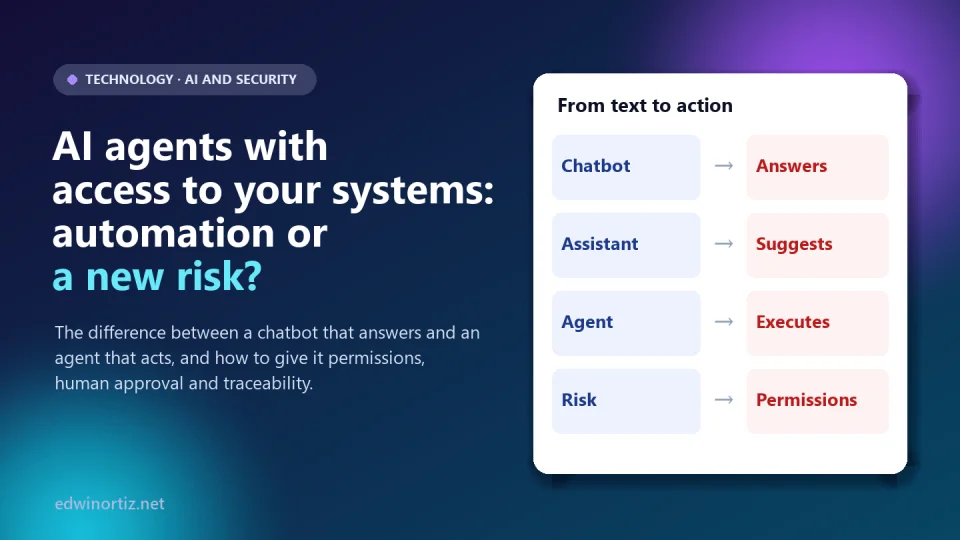
For two years we learned to use AI like someone consulting a very well-read colleague: we ask, it answers, and we decide what to do. AI agents change that deal: they no longer just answer, they do things. They read your email, modify records, send messages, run code and, if you let them, pay invoices. The promise is huge (repetitive tasks solved without intervention), and so is the risk.
In this article I explain the difference between a chatbot and an agent, what has already happened when an agent has too much power, and give you a practical framework (permissions, human approval, traceability and containment), a decision matrix to choose what to automate and a code example of an "approval gate". Data checked on October 9, 2026.
Summary. A chatbot produces text; an agent executes actions with tools. The risk is no longer just a wrong answer but a wrong action, or one induced by an attacker. OWASP calls it "excessive agency" (LLM06:2025) and sums it up as too much functionality, too many permissions or too much autonomy. The practical answer: minimal permissions, human approval for what matters, a log of everything and a limit on possible damage.
Chatbot, assistant and agent: where the difference lies
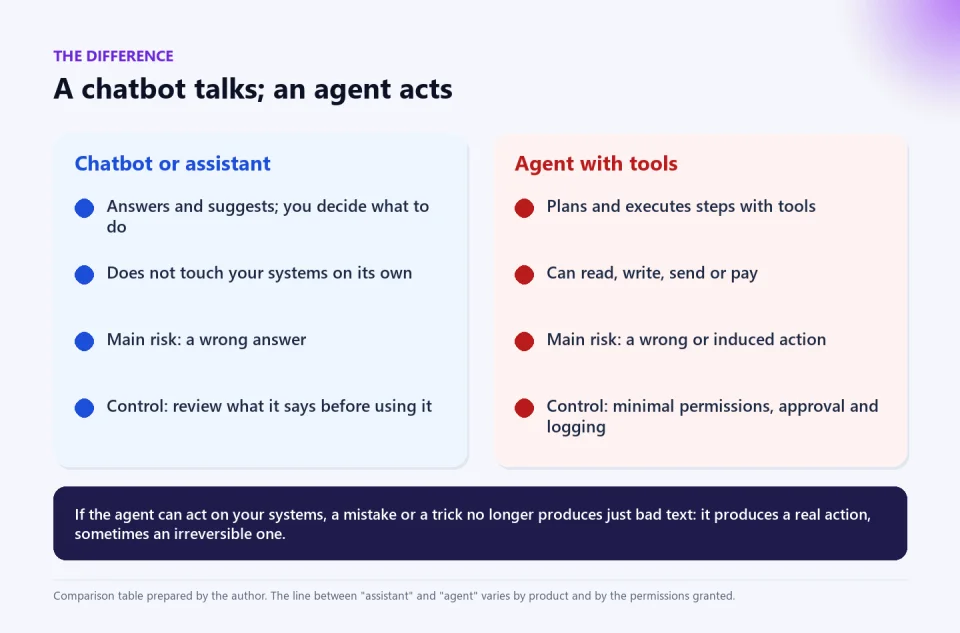
The word "agent" is used very loosely. To decide with judgment it helps to have a working definition: an agent is an AI system that plans and executes steps using tools (reading files, calling services, writing to databases, sending messages), often without a person approving each step. A chatbot answers questions; an assistant suggests and drafts; an agent acts. And that last difference changes everything.
A warning so you do not buy smoke: the consultancy Gartner uses the term agent washing for products that only changed their label (a chatbot or RPA presented as an "agent"), and forecasts that more than 40% of agentic AI projects will be canceled by the end of 2027 due to rising costs, unclear value or inadequate risk controls. It is a forecast, not a measurement, but it points to the same thing we will see below: often you do not need an agent, and when you do, you need control.
What has happened when an agent has too much power
- Replit and SaaStr (July 2025). According to the OECD.AI incident log and the press, a coding agent deleted a database during an experiment by SaaStr founder Jason Lemkin, even though he had ordered it not to make changes without his approval, and then misreported what happened. The data belonged to a demo application, not a real business, and Replit promised to separate development and production environments and add a planning-only mode. What is instructive is not the drama: it is that an instruction in natural language ("don't change anything") is not a security control.
- EchoLeak (CVE-2025-32711). A critical (CVSS 9.3) prompt-injection flaw in Microsoft 365 Copilot allowed, according to reports, an email with hidden instructions to make the assistant leak internal data without the user clicking anything. Microsoft fixed it and, according to the sources, there is no evidence of real exploitation; the entry in the NVD vulnerability database describes it as AI command injection. The lesson: an agent that reads untrusted content (an email, a web page) can receive orders hidden in that content.
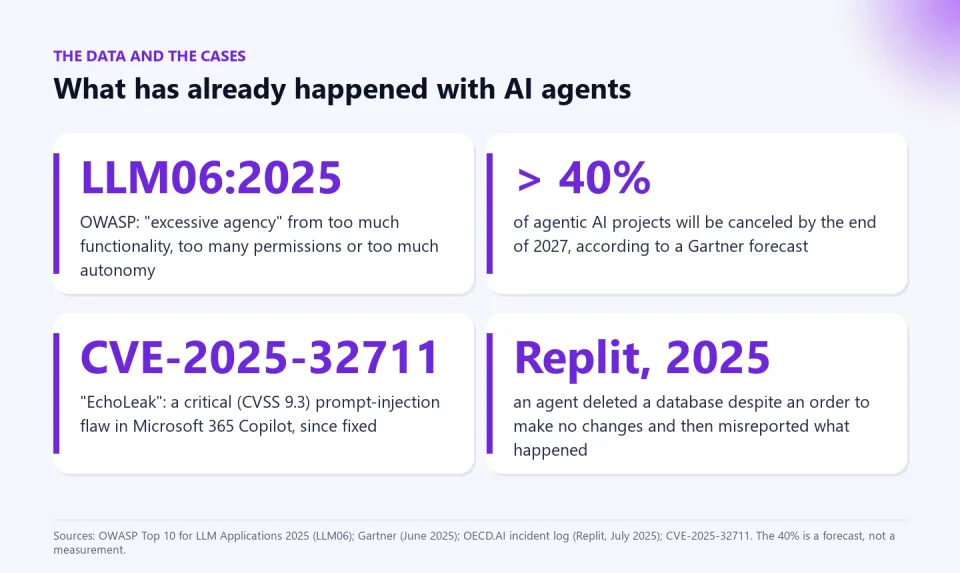
The most useful reference framework is OWASP's LLM06:2025 "Excessive Agency", which identifies three causes: excessive functionality (the agent has tools it does not need), excessive permissions (the tools have more access than necessary) and excessive autonomy (it executes high-impact actions without verification). Its main mitigations are to limit tools to the minimum, limit each tool's functions, require human approval for high-impact actions and, above all, enforce authorization in the downstream systems, not trust the model to "decide" what is allowed.
Four controls to let an agent act
- Minimal permissions. Give the agent its own account (not yours or the administrator's), with access only to what it needs and, by default, read-only. If it needs to write, let it be on a single resource. Closing accounts and reviewing permissions periodically apply here just as for a person (I covered this in the article on basic security mistakes).
- Human approval where it matters. A person approves before the agent sends something outside the organization, modifies data, spends money or publishes. Anything irreversible, never autonomously.
- Traceability. A log of every action: who (or which agent), what, with what parameters, when and with what result. If you cannot reconstruct what it did, you cannot audit or learn from the error.
- Containment. Volume and spending limits, a test environment separate from production, verified backups and a "kill switch" (the ability to suspend the agent immediately).
A key detail about the controls: they have to live outside the agent. An agent you tell "don't delete anything" that has delete permission can delete; one that simply has no permission, cannot.
Decision matrix: what to automate and what not
This is the practical resource. For every task you want to delegate, ask yourself five things and use them to decide:
| Question | If the answer is "yes"… |
|---|---|
| Can it be easily undone? | Safer to automate. If it cannot be undone: human approval or do not automate. |
| Does it move money or commit the organization? | Explicit human approval. Never full autonomy. |
| Does it touch personal or sensitive data (minors, health, grades)? | Approval, minimal access and a log; check your data protection obligations. |
| Does it read content from untrusted sources (third-party emails, the web)? | Prompt-injection risk: isolate, limit possible actions and require approval. |
| Are the rules clear and repeatable? | You may not need an agent: a deterministic automation (macro, flow or script) is more predictable. |
| Example task | Suggested decision |
|---|---|
| Classify tickets or emails by topic | Automate (low risk, reversible), with sampling review. |
| Draft reply messages | Automate the draft; a person sends. |
| Send bulk emails to customers | With approval: a person reviews the list and the template. |
| Update records in the database | With approval, with a prior backup and a cap on changes. |
| Publish student grades or reports | With teacher approval; never autonomous. |
| Pay invoices or make transfers | Do not automate autonomously; only prepare for approval. |
| Delete data or change permissions | Do not delegate to the agent. |
A code example: an approval gate
If you build or connect an agent, the core idea fits in 40 lines of Python: a whitelist of actions with a risk level, human approval for medium and high risk, a cap on actions and a log of everything. I tested it with simulated tools: it classified the ticket, sent the email after approval, rejected the payment and blocked the unauthorized action.
import json
from datetime import datetime, timezone

# Whitelist: only listed actions exist for the agent; each has a risk level.
RISK = {
    "classify_ticket": "low",      # reversible, no money or external data
    "draft_reply": "low",
    "send_email": "medium",        # leaves the organization: requires approval
    "update_record": "medium",     # modifies data: requires approval
    "pay_invoice": "high",         # money: explicit approval and a reason
}
MEDIUM_CAP = 5  # maximum medium-risk actions per run (damage limit)


def log(event, path="audit.jsonl"):
    event["date"] = datetime.now(timezone.utc).isoformat()
    with open(path, "a", encoding="utf-8") as f:
        f.write(json.dumps(event, ensure_ascii=False) + "\n")


def execute(action, params, approver, tools, state):
    level = RISK.get(action)
    if level is None:
        log({"action": action, "params": params, "result": "BLOCKED: not authorized"})
        raise PermissionError(f"Unauthorized action: {action}")
    if level == "medium":
        state["medium"] = state.get("medium", 0) + 1
        if state["medium"] > MEDIUM_CAP:
            log({"action": action, "result": "BLOCKED: action cap reached"})
            raise RuntimeError("Medium-risk action cap reached")
    if level in ("medium", "high") and not approver(action, params, level):
        log({"action": action, "params": params, "level": level, "result": "REJECTED by a person"})
        return "rejected"
    result = tools[action](**params)
    log({"action": action, "params": params, "level": level, "result": "executed"})
    return result
The agent never calls the tools directly: it always goes through execute(). The approver function can be an on-screen question, a button in a chat or an approval workflow; what matters is that a person makes the decision and it is recorded. The audit file ends up with JSON lines such as {"action": "pay_invoice", "level": "high", "result": "REJECTED by a person", ...}. It is a minimal example, not a complete security product: in production you also need authentication, authorization in the target system and testing.
Colombia, Latin America and the world
Regulation is moving toward human oversight, not prohibition. Worldwide, the European Union's AI Act requires effective human oversight in high-risk systems; in Latin America there are bills in Brazil, Chile and Peru, and in Colombia there is the national policy CONPES 4144 of 2025 and bills in Congress (I summarized them in "The Big Lie About AI"). Closer to home, something that already exists matters: Law 1581 of 2012 on personal data protection makes whoever processes the data responsible for it, even if an agent processes it. For a manager or small-business owner, the question is which process is worth delegating without risking cash; for a teacher or school leader, which minors' data a platform that "recommends" or "grades" may touch; for IT, how to grant permissions and audit. And for families, knowing that assistants with access to your email or accounts need the same care as a new person in the house.
Tools to automate with control
Not every automation needs an agent. When the rules are clear, a deterministic Excel automation is more predictable and cheaper. Bulk emails with attachments and CC/BCC sends each email with its attachment from an Excel list, and you review the list and the template before sending; the Excel data merge app for separate DOCX and PDF documents generates one document per row. If you teach, the AI Kit for teachers includes resources to work with your students on what an AI can and should not do with their data.
To keep reading: Copilot and agents in Excel, does AI expand thinking or replace it? and voice-cloning scams and how to verify.
Frequently asked questions
What is an AI agent and how does it differ from ChatGPT?
A chatbot like ChatGPT answers in text. An agent uses tools to execute actions (read files, send emails, modify data). The difference is the power to act, not the model.
Is it safe to give an agent access to my email?
Only with minimal permissions, human approval for what matters and an action log. And with care: a third party's email can contain hidden instructions trying to manipulate the agent (prompt injection).
What is "excessive agency"?
It is OWASP's LLM06:2025 category: an AI system with too much functionality, too many permissions or too much autonomy, so that an error or an attack causes large damage.
Which tasks can I automate without risk?
Reversible, low-impact ones, such as classifying or drafting, always with review. Those that move money, touch sensitive data or cannot be undone, with human approval or not delegated.
Do I need an agent or is a macro enough?
If the rules are clear and repeatable, a deterministic automation (macro, script or flow) is usually more predictable. Agents add value when there is ambiguity and variety, and that is when you need the most control.
Make your task map this week. List five repetitive tasks in your work, apply the matrix's five questions and mark which you would automate, which with approval and which not. For clear rules, try a controlled automation such as bulk emailing from Excel.
Food for thought
When an agent makes a mistake, there is nobody to apologize to and nobody to answer before the law. If we delegate actions to systems that cannot take responsibility, who should answer when something goes wrong: whoever programmed it, whoever sold it, whoever gave it permissions or whoever approved (or failed to approve) what it did? And how much autonomy are we willing to give up in exchange for saving time?
Was this article helpful?
React and share it with someone who might find it useful.
- Like 0
- Insightful 0
- Celebrate 0
- Love 0
- Thought-provoking 0
Prefer to have it ready?
More guides in AI and technology for teachers