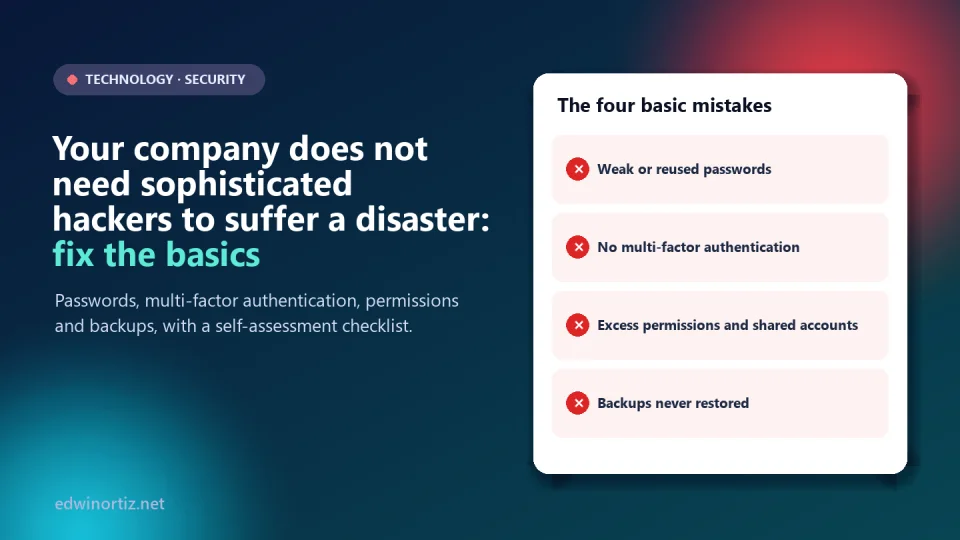
When we think of a cyberattack we imagine an expert typing at lightning speed in a dark room. Reality is duller and more uncomfortable: most disasters start with a reused password, an account without a second verification, a permission nobody reviewed or a backup nobody tested. You do not need more sophisticated hackers; it is enough that your basic mistakes are still there.
In this article I show you what the data say, which four basic mistakes cause the most damage and give you a 20-point checklist to audit the basic security of your company, accounting office or school. Data checked on October 9, 2026.
Summary. According to Verizon's 2025 DBIR, stolen or abused credentials are the top initial access route (22% of breaches) and about 60% of breaches involve a human element. Multi-factor authentication cuts the risk of an account being compromised by more than 99% in a Microsoft study. Four fronts: passwords, MFA, permissions and backups you can actually restore.
What the data say: the basics are still the front door
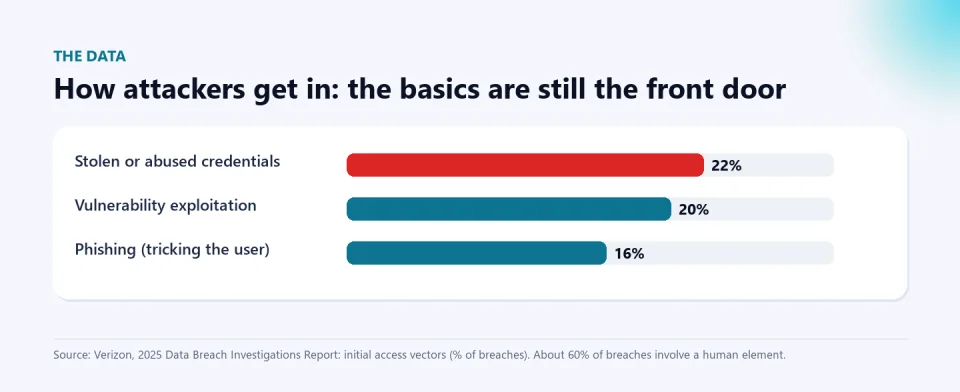
Verizon's 2025 Data Breach Investigations Report analyzes thousands of real breaches. Among its findings, the most common way in was credential abuse (22%), followed by vulnerability exploitation (20%) and phishing (16%); and about 60% of breaches had a human component, such as falling for a trick or using stolen credentials. One nuance that is often confused: the 88% figure circulating in summaries refers to basic web attacks where stolen credentials were used, not to all breaches.
How much does a mistake cost? IBM's 2025 Cost of a Data Breach report estimates a global average of US$4.44 million per breach; in Latin America, the report's sample (which includes companies from Argentina, Brazil, Chile, Colombia and Mexico) came to about US$2.51 million. These are averages from large and medium companies and there is no Colombia-only figure, but the reading is clear: a small business does not need to lose millions for the blow to be fatal. And local context matters: Colombia's National Digital Security Strategy placed it as the second most attacked country in Latin America in 2025, with 17% of the region's attempts, as Portafolio reported.
Mistake 1: weak, reused or poorly managed passwords
The NIST SP 800-63B-4 guidance (published in July 2025) changed several myths: it recommends prioritizing length over complexity, not forcing periodic changes without evidence of compromise, and checking passwords against lists of leaked or common ones. In practice, for a small company:
- Use long passwords (multi-word phrases) that are unique for every service.
- Adopt a password manager: it is the only realistic way to have unique keys without writing them on paper or in an Excel file.
- Do not force a change every 90 days: that produces "Password2026!" and "Password2027!". Change it when a leak is suspected.
- Check whether your emails appear in known breaches and change the affected passwords.
Mistake 2: not using multi-factor authentication (MFA)
A stolen password stops working if a second factor is required. A Microsoft Research study (2023) of accounts with suspicious activity found that MFA reduced the risk of compromise by 99.22% across the population and by 98.56% when credentials had already leaked. It is a risk reduction observed on Microsoft accounts, not a universal guarantee, and the authors found that authenticator apps work better than SMS messages. Prioritize in this order:
- Email (it resets every other account).
- Online banking and payment accounts.
- Admin accounts (hosting, domain, cloud, company social media).
- Then every other service that allows it.
Mistake 3: excessive permissions and accounts nobody closes
"Least privilege" means each person accesses only what they need for their job. In practice it breaks in four ways: everybody is an administrator "so they don't complain", one account is shared among several people, access is not closed for someone who left and shared folders are open to "anyone with the link". A school lives it with teachers' accounts when they leave mid-year and with access to grades; a small business, with the outside accountant who keeps access to everything. Solutions: roles by position, one account per person, an offboarding list to close access on the last day and quarterly reviews of who sees what.
Mistake 4: backups that were never verified
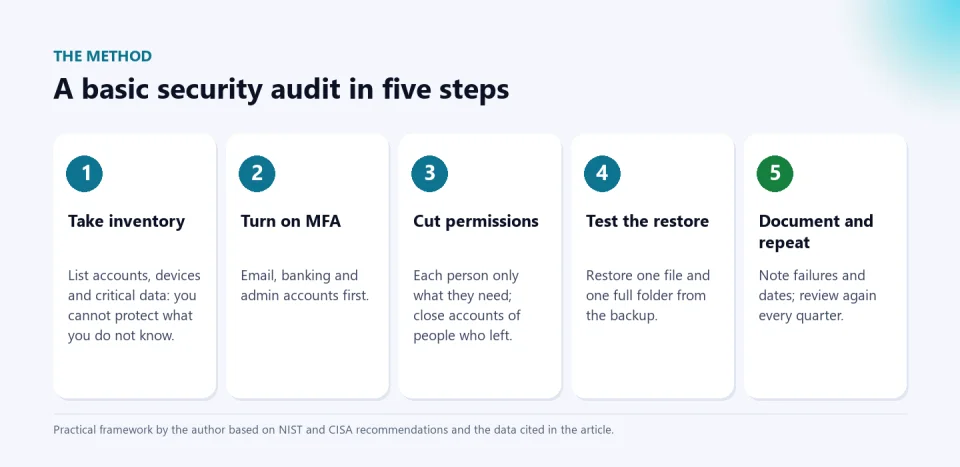
Having files "in the cloud" is not having a backup: synchronization also replicates deletions and files encrypted by ransomware. A useful backup is an independent copy, with versions, that you have tested restoring. The classic 3-2-1 rule (three copies, on two media, one off-site) is still a good starting point. And the only way to know whether it works is a restore test: pick a file and a folder, restore them on another computer and check that they open. If you never did, you do not have a backup: you have a hope.
Checklist: basic security self-assessment
This is the practical resource. Answer "yes" or "no" to each point and count your "yes" answers. It is a practical self-diagnostic tool, not a certification or a formal audit.
| Area | Question (answer yes or no) |
|---|---|
| Passwords | 1. All important accounts have long passwords that differ from each other. |
| Passwords | 2. We use a password manager (nobody keeps passwords on paper, in chats or in unencrypted files). |
| Passwords | 3. We do not force periodic changes for no reason, but we change them when a leak is suspected. |
| Passwords | 4. Admin passwords are not shared over WhatsApp or email. |
| Passwords | 5. We check whether our emails appear in known breaches. |
| MFA | 6. The company email has two-step verification. |
| MFA | 7. Online banking has MFA and transaction notifications are on. |
| MFA | 8. Admin accounts (domain, hosting, cloud) have MFA. |
| MFA | 9. We use an authenticator app or security key, not just SMS, where possible. |
| MFA | 10. We store recovery codes safely. |
| Permissions | 11. Each person has their own account; none are shared. |
| Permissions | 12. Only those who need it are administrators. |
| Permissions | 13. We close access for people who leave on the same day. |
| Permissions | 14. Shared folders are not open to "anyone with the link". |
| Permissions | 15. We review who has access to what at least every quarter. |
| Backups | 16. We have at least one independent copy of critical data (not just synchronized). |
| Backups | 17. One copy is off-site or disconnected, safe from ransomware. |
| Backups | 18. We tested restoring a file and a folder in the last 6 months. |
| Backups | 19. We know how long it would take to operate again (and how much data we would lose). |
| Backups | 20. Someone has the restore procedure in writing. |
How to read your score (indicative). 17 to 20 "yes": a good base; keep reviewing. 11 to 16: there are gaps worth closing this month, starting with MFA and backups. 10 or fewer: high priority; spend a week closing the email, banking and backup points. If an incident exposes personal data, you also have legal obligations: according to several law firms, in Colombia security incidents must be reported to the Superintendency of Industry and Commerce in the National Database Registry within 15 business days of detection; confirm the current text at sic.gov.co or with a lawyer.
Colombia, Latin America and the world: where the gap is
Worldwide, MFA and backups are already minimum requirements for large companies and for cyber insurance. In Latin America, IBM finds that adopting AI and automation in security lowers costs, and 75% of companies in the region already use them at different maturity levels. In Colombia the gap is usually one of priorities, not money: many small businesses and schools have antivirus but no MFA, and spreadsheets with passwords taped to the monitor. For teachers and school leaders the risk is double: sensitive data of minors and a paralyzed school operation. For families the lesson is the same on a smaller scale: MFA on email and on the children's accounts, and photos backed up.
Tools to start today
If your business invoices or sends documents by email, standardize the sender and the format: the Invoice with email delivery to the customer always keeps the same template and bank details, so any account change that arrives "on your behalf" stands out as an anomaly (I explained it in the article on voice-cloning scams). And if you teach, the AI Kit for teachers includes a digital citizenship sequence (footprint, privacy, cyberbullying and personal data) to bring these habits into the classroom; the AI Exam Generator turns this checklist into a quiz for your students (free demo).
If you need someone to help you implement templates and controls in Excel, there is the PLUS advisory. And to keep reading: Is Excel dead in the age of AI? and how to automate tasks in Excel and reduce errors.
Frequently asked questions
What should I do first to protect my company?
Turn on two-step verification on email and online banking, and run a restore test of your backups. They are the two lowest-cost, highest-effect changes.
Is antivirus enough?
No. It protects against some malware, but not against a stolen password, an excessive permission or a nonexistent backup, which are the fronts that weigh most in the data.
How often should I change passwords?
NIST no longer recommends mandatory periodic changes without evidence of compromise. Better: long, unique passwords, a password manager and an immediate change if a leak is suspected.
Is the cloud a backup?
Not necessarily. Synchronization replicates errors, deletions and encryption. A backup has versions, is independent and is tested by restoring.
What do I do if I was already attacked?
Isolate the device, change passwords from a clean device, tell the bank if money was involved, keep the evidence and report it (in Colombia, the Police's CAI Virtual and the Attorney General's Office). If personal data was involved, assess the report to the SIC.
Do your self-assessment today. Answer the 20 points, close the three most urgent ones this week and schedule a restore test. Share the checklist with whoever manages your systems and, if you teach, bring it to class with the AI Kit for teachers.
Food for thought
We spend millions on physical locks and alarms and almost nothing on checking who holds the digital keys. If the most common security mistake is human, is it fair to punish whoever falls for a trick, or should we design systems where one slip does not have catastrophic consequences? And who should answer when a small company loses its customers' data for not doing the basics: the owner, the technology provider or the lack of a security culture across the whole country?
Was this article helpful?
React and share it with someone who might find it useful.
- Like 0
- Insightful 0
- Celebrate 0
- Love 0
- Thought-provoking 0
Prefer to have it ready?
More guides in AI and technology for teachers