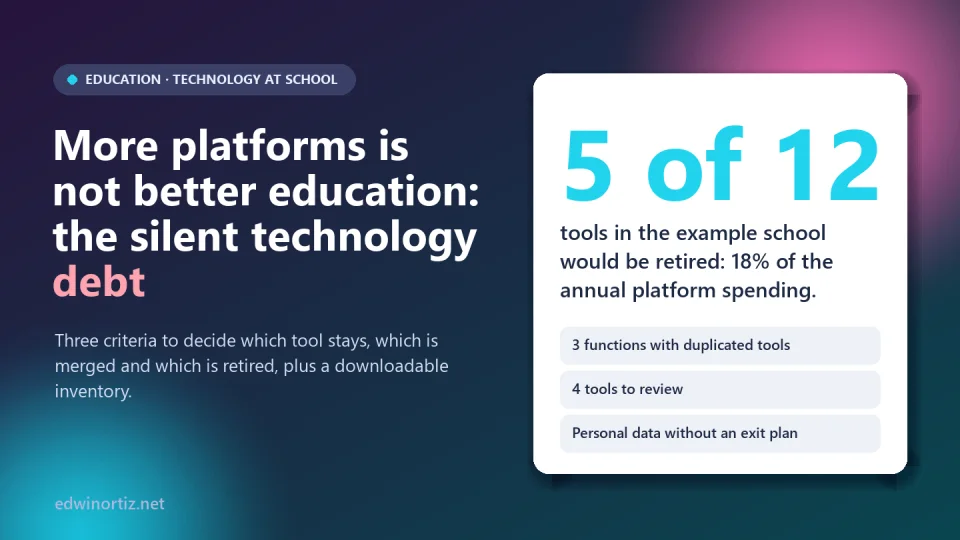
A school starts with an academic platform. Then comes a virtual classroom, then an app to talk to families, the math platform brought by an enthusiastic teacher, an AI slide generator, a WhatsApp group for each class… Each decision, on its own, seemed reasonable. Together they form something almost nobody measures: a silent technology debt, made of accounts nobody remembers, data scattered across places nobody controls and tools that do the same thing under different names.
In this article I explain what that debt is, what the data say about the growth of tools in schools and propose three criteria (integration, pedagogical value and sustainability) to decide which tool stays, which is merged and which is retired. It includes a downloadable Excel inventory with an example school. Data verified on October 9, 2026.
Summary. More tools does not mean better education: UNESCO warns that there is little robust, independent evidence on the value of education technology and that products change on average every 36 months. Each new tool adds cost, data to protect, training and support. The answer is not to ban, but to inventory, score and decide with explicit criteria and together with the people who use them.
What technology debt is
The term "technical debt" was proposed by programmer Ward Cunningham in 1992 to describe software shortcuts that save time today and charge interest tomorrow. Applied to a school, the idea extends: every tool adopted without criteria is a loan paid with maintenance, accounts to manage, data to protect and the attention of teachers who already have little time. The interest is silent because it does not appear in a single budget: it is spread across the principal's office, coordination, IT and every classroom.
Typical signs: two or three tools for the same function, teachers typing the same information in several places, accounts of people who no longer work at the school, paid platforms used by a single class, and nobody who can say for sure where the students' data are.
What the data say
UNESCO's 2023 Global Education Monitoring Report concludes that there is little robust, impartial evidence on the added value of digital technology in education, that much of the evidence comes from those who sell it and that products change, on average, every 36 months, often before they can be evaluated. In a survey of teachers and administrators in 17 US states, only 11% asked for peer-reviewed evidence before adopting a tool.
On the size of the problem, LearnPlatform's EdTech Top 40 report (now part of Instructure), based on real usage in US districts, reported that districts used on average 2,591 different tools in the 2022-23 school year, up from 2,547 the year before (according to K-12 Dive's coverage, July 2023). Those are districts with thousands of students, not a single school; but they show the trend: tools accumulate faster than they are retired. I found no comparable figure published for Colombia, so the first step is to do your own inventory.
Three criteria to decide
I suggest scoring each tool from 0 to 2 on three criteria (framework by the author):
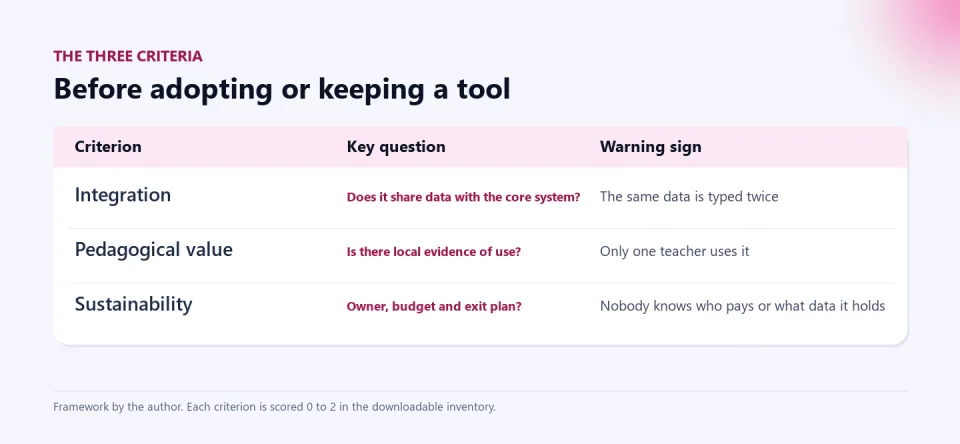
- Integration. Does it share data with the core system (enrollment, grades, users) or force double entry? An isolated tool creates inconsistencies and extra work. 0 = island; 1 = manual import or export; 2 = integrates automatically.
- Pedagogical value. Is there local evidence that it improves something: attendance, homework submission, participation, results? The vendor's promise is not enough. 0 = unused; 1 = used by a small group; 2 = used and backed by evidence.
- Sustainability. Does it have an owner, a budget and a plan to extract the data if it stops being used? 0 = nobody answers for it; 1 = owner but no budget or no exit plan; 2 = owner, budget and exit.
The sum (0 to 6) suggests a decision: retire or replace if value is 0 or the score is 2 or less; merge if a function is duplicated and a better-scoring tool exists; keep with 5 or more; and review in the other cases. It is a starting point for conversation, not a verdict.
An example school: 12 tools
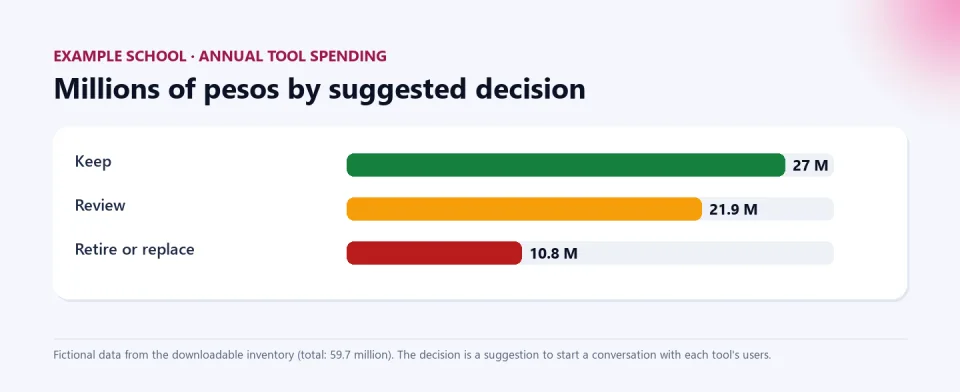
The downloadable inventory includes a fictional school with 12 tools and an annual spend of 59.7 million pesos. Scoring them gives this:
| Suggested decision | Tools | Annual spend |
|---|---|---|
| Keep | Academic platform, office suite, assessment forms | 27.0 million |
| Review | Institutional virtual classroom, family messaging app, math platform A, videoconferencing | 21.9 million |
| Retire or replace | A teacher's own virtual classroom, WhatsApp groups, math platform B, AI slide generator, unused reading platform | 10.8 million (18.1%) |
Notice what the exercise reveals. Three functions were duplicated (virtual classroom, family communication and math practice): half the tools competed with each other. A reading platform cost 5.4 million and scored zero on value. And seven of the twelve held personal data with low sustainability, that is, no owner or no plan to extract the data. That last point is the most serious: processing minors' data demands care (see student data and AI personalization), and Colombia's Law 1581 of 2012 makes the data controller, here the school, answerable for the data it hands to third parties.
One caution: retiring is not blindly deleting. Before closing a tool, consult its users, back up its data and define when and how students' data will be deleted.
How to do it in three weeks
- Week 1: inventory. List every tool (including free ones and those a teacher adopted on their own): function, users, cost, data handled and owner. Ask the teachers; the "invisible" accounts show up there.
- Week 2: scoring. Score with the leadership team and at least two teachers who use them. Record evidence, not just opinion.
- Week 3: decision and calendar. Decide what is kept, merged or retired, with dates, backups and communication to the community. Name an owner and repeat the exercise every year.
And a rule for the future: a new tool comes in only if another goes out or if it passes the three criteria before purchase (the three-year cost analysis in buy, subscribe or build helps with the economic factor).
Colombia, Latin America and the world
Worldwide, the debate has moved from "do we have technology?" to "what does it do for learning?". In Colombia and Latin America the pressure comes from two sides: the persistent connectivity and equipment gap in many areas and, in schools that do have resources, the constant supply of platforms and AI. According to the OECD (TALIS 2024), about 53% of Colombian teachers used AI in the past year, more than the OECD average (36%): use is growing faster than institutional rules. For principals, the task is ordering the portfolio and accounting for the spend; for teachers, that tools save work instead of multiplying it (see pedagogical autonomy and platforms); for families, knowing which companies receive their children's data and why so many apps are used.
Tools designed to add up, not pile up
Part of reducing debt is choosing a few tools that do several things well and let the teacher decide. The AI Exam Generator brings exam creation, solutions and grading together in one place; and the AI Kit for Teachers organizes recipes by subject without requiring yet another platform to maintain. For attention to diversity, PIAR con IA keeps each student's reasonable adjustments in a single document, reviewed by the expert team, instead of scattering them across folders and chats.
Keep reading: buy, subscribe or build, the cloud is not a backup and basic security mistakes.
Frequently asked questions
What is technology debt in a school?
It is the accumulated cost of tools adopted without criteria: maintenance, accounts, data to protect, training and duplicated work, paid for with the school's time.
How many digital tools are too many?
There is no universal number. The signs are duplication (several tools for the same function), low use and no owner. That is why it is better to score each one than to count them.
Should I remove free tools?
Free tools cost too: personal data, time and risk. Apply the same criteria and pay attention to what student data they handle and who answers for it.
How do I convince a teacher to give up a favorite tool?
With evidence and dialogue: show the duplication, ask what their tool does better and assess whether the school can adopt it instead of the other. Retiring without listening breeds resistance.
What do I do with the data of a platform I am closing?
Export and back up what must be kept, and ask the vendor to delete the students' data, leaving written confirmation.
Do the inventory this week. Download the school tools inventory, replace the example data with yours and score each tool. It needs Excel 2019 or Microsoft 365 (the decision column uses MAXIFS). The workbook is in Spanish.
Food for thought
Every tool we adopt promises to save time, but each also consumes attention, data and budget. Is the school choosing its tools for what its educational project needs, or for what the market offers? And who should have the last word on retiring a platform that students use: the principal, the teachers who use it, the families whose data it stores or the students themselves?
Was this article helpful?
React and share it with someone who might find it useful.
- Like 0
- Insightful 0
- Celebrate 0
- Love 0
- Thought-provoking 0
Prefer to have it ready?
More guides in AI and technology for teachers