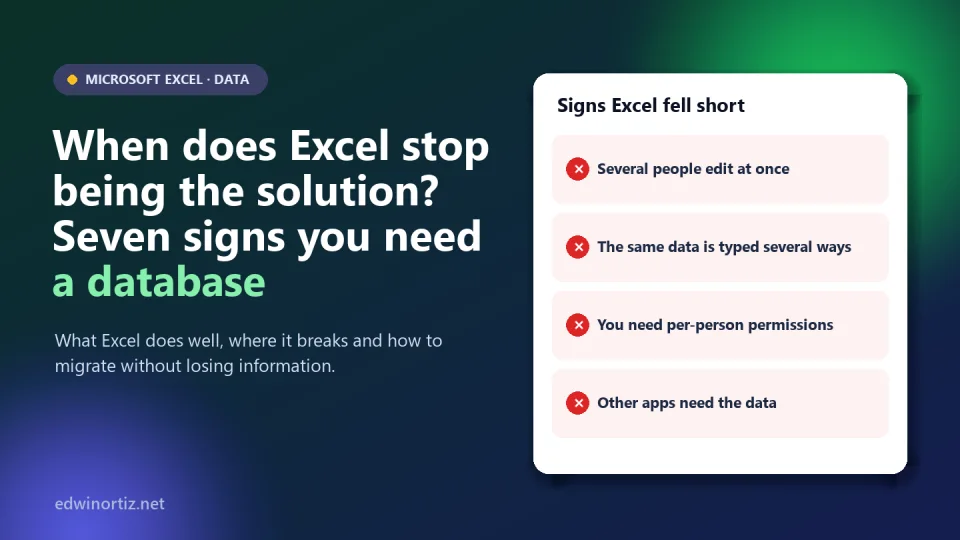
Excel is probably the most widely used data tool in the world, and for good reason: it is flexible, familiar and solves a huge range of needs without programming. But there comes a moment when an Excel workbook stops being a spreadsheet and, without anyone deciding it, becomes the information system of an office or a school: customers, enrollments and inventories live there. And that improvised system begins to fail in predictable ways.
This article does not say Excel is bad: it says when it falls short, with seven concrete signs, an example with tested SQL code, a comparison and a downloadable self-assessment and migration workbook (in Spanish). Technical data verified on October 9, 2026.
Summary. Excel's technical limits (over a million rows per sheet) are rarely the real problem; the real problems are simultaneous editing, repeated data that does not match, the lack of permissions and audit, integrity and integration with other applications. If you recognize four or more signs, plan a migration; with one or two, strengthening controls is often enough.
What Excel does very well
Before migrating, let us acknowledge its strengths: fast analysis, calculations, charts, prototypes, reports and what-if models. For one person or a small team with clear turns and non-sensitive data, Excel is an excellent solution. The mistake is not using Excel: it is continuing to use it as a database when the process already demands something else.
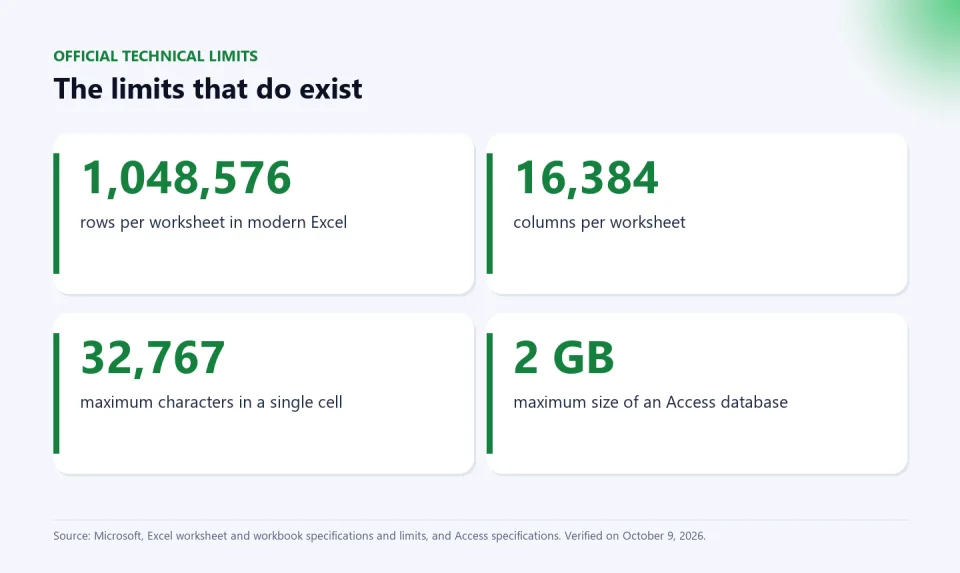
The technical limits exist, but they are usually far away. According to Microsoft's official specifications, a worksheet supports 1,048,576 rows and 16,384 columns, and a cell can hold up to 32,767 characters; an Access database is limited to 2 GB (including all its objects). Almost nobody hits the row limit before hitting the seven signs below.
The seven signs
- Several people edit at once and overwrite each other. "final", "final_v2" and "final_definitive" files appear. Excel allows co-authoring on files stored in Microsoft's cloud, but it lacks the rules, record-level locking and traceability of a database.
- The same data is written in several ways. "Ferretería El Tornillo", "Ferreteria El Tornillo" and "FERRETERÍA EL TORNILLO" are three different customers to Excel (see the example below).
- You need per-person permissions or an audit trail. Having a fifth-grade teacher see only their students, or knowing who changed a grade and when, is hard to achieve in a shared workbook.
- The file is slow, heavy or fragile. It takes minutes to open, freezes or is nearing hundreds of thousands of rows with heavy formulas.
- You need to prevent inconsistent data. Orders for customers that do not exist, duplicate codes, impossible dates. A database can reject them by rule; Excel only warns if someone set up validation and nobody deletes it.
- Other applications need the data. If someone copies and pastes every week from the workbook to billing, the website or bulk email, you already have a process that calls for a central, automatic source.
- You handle personal or sensitive data. A file traveling by email, with copies on every computer, is hard to protect and audit. Colombia's Law 1581 of 2012 requires data controllers to apply security measures to personal data (see student data). That is why a document like a student's PIAR should not live in a sheet that gets passed around: PIAR con IA keeps it in an account with controlled access.
An example with code: two customers that look like five
A small business records six orders in a sheet. Two real customers, but written with and without accents and in capitals. Excel, when counting distinct customers or summarizing with a pivot table, treats them as different customers. The same happens in SQL when grouping on free text. I checked it with SQLite:
-- Flat file: customer as free text
SELECT cliente, COUNT(*) AS pedidos, SUM(valor) AS total
FROM pedidos_plano GROUP BY cliente;
-- Result: 5 "customers" (Ferretería, Ferreteria, FERRETERÍA, Papelería, Papeleria)
-- Each with 1 or 2 orders and partial totals.
The fix is not more discipline when typing (nobody always writes the same way) but modeling the data: a customers table with a unique code and an orders table that points to that code.
CREATE TABLE clientes(
  id INTEGER PRIMARY KEY,
  nombre TEXT UNIQUE,
  ciudad TEXT);

CREATE TABLE pedidos(
  pedido INTEGER PRIMARY KEY,
  fecha TEXT,
  cliente_id INT REFERENCES clientes(id),
  producto TEXT, cantidad INT, valor INT);

SELECT c.nombre, COUNT(*) AS pedidos, SUM(p.valor) AS total
FROM pedidos p JOIN clientes c ON c.id = p.cliente_id
GROUP BY c.nombre;
-- Ferretería El Tornillo | 3 | 570000
-- Papelería Central      | 3 | 350000
Now the totals are right and, with foreign keys enabled, the database rejects an order for a customer that does not exist ("FOREIGN KEY constraint failed") and a repeated customer ("UNIQUE constraint failed"), which I also tested. The downloadable workbook includes this same case in both forms: the flat file (where a formula counts 4 distinct "customers", because Excel ignores capitalization but not accents) and the normalized model.
Excel, database or web application
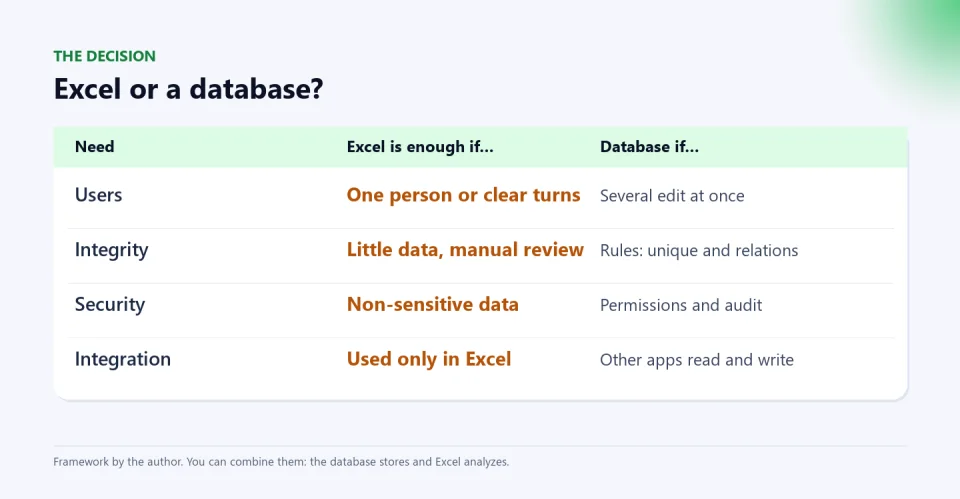
It is not a choice between good and bad, but between needs:
| Option | Strength | Limitation | When to choose it |
|---|---|---|---|
| Excel | Flexible, quick to build, ideal for analysis | Limited simultaneous editing, no integrity rules or fine-grained permissions | A small team, non-sensitive data, reports and models |
| Database (Access, SQLite, PostgreSQL, SQL Server…) | Integrity, queries, permissions, backup, volume | Requires designing the model and someone to administer it | Several users, related data, business rules |
| Web application on a database | Forms, access from anywhere, roles | Higher development and maintenance cost | Many external users or critical processes (see buy, subscribe or build) |
And it is not one or the other: the most sensible approach is usually the database stores and Excel analyzes. With Power Query you can connect Excel to a database and analyze it with pivot tables, with no copy and paste (see Power Query, VBA, Office Scripts and Python).
How to migrate without losing information
- Back up and freeze the current file with a date (see the cloud is not a backup).
- Name the owner of the data and who can see or change what.
- Identify the entities (customers, products, orders) and each one's unique key.
- Clean duplicates and variants before importing (see importing CSV correctly).
- Import into a test environment and compare totals with the original file; they must match.
- Decide how new data will be captured and train users.
- Keep the old file read-only for a while and measure the results.
The "Checklist_migracion" sheet in the downloadable workbook has these steps with checkboxes.
Colombia, Latin America and the world
Everywhere, small businesses and schools start in Excel because they already have it and it works. In Colombia and Latin America, cost weighs too: moving to a system with a server, licenses or development can look like a luxury, which is why comparing first matters (see the hidden risk of Excel). For teachers and coordinators, the most common sign is the same student list in five files; for principals, the risk of sensitive data in an uncontrolled file; for families, that their children's data does not travel by email in unprotected sheets.
Tools to keep your Excel data in order
If you do not need a database yet, these templates help you keep data organized and controlled:
There is also a free Excel with AI guide to work your data better.
Frequently asked questions
How many rows can Excel handle?
According to Microsoft, a worksheet supports 1,048,576 rows and 16,384 columns. In practice, the file becomes slow or unmanageable much earlier, especially with heavy formulas.
When should I move from Excel to a database?
When several people edit at once, the same data appears repeated and different, you need permissions or an audit trail, or other applications require the data. With four or more signs, plan the migration.
Is Access still useful or is it obsolete?
It works for small teams on Windows, with the 2 GB limit per database. For more users or web access, other databases (PostgreSQL, SQL Server or MySQL) are usually chosen.
Can I keep using Excel after migrating?
Yes, and it is recommended: the database stores the data and Excel queries and analyzes it with Power Query and pivot tables.
Do I need to know how to program?
For the basic model, a few SQL statements like those in the example are enough, and visual tools exist. For a full application, technical support is advisable.
Do the self-assessment today. Download the seven-signs workbook (in Spanish), mark which ones apply to you and see what it recommends. It includes the sample data and the migration checklist.
Food for thought
Many organizations never decided that their information would live in Excel: it simply happened. Is Excel's convenience a merit of the tool or a trap that keeps us from ordering our processes? And if the institution's most valuable data (its students, its customers) lives in a file anyone can copy, who is responsible for making sure it is not lost, altered or leaked?
Was this article helpful?
React and share it with someone who might find it useful.
- Like 0
- Insightful 0
- Celebrate 0
- Love 0
- Thought-provoking 0
Prefer to have it ready?
More guides in Excel automation for office work