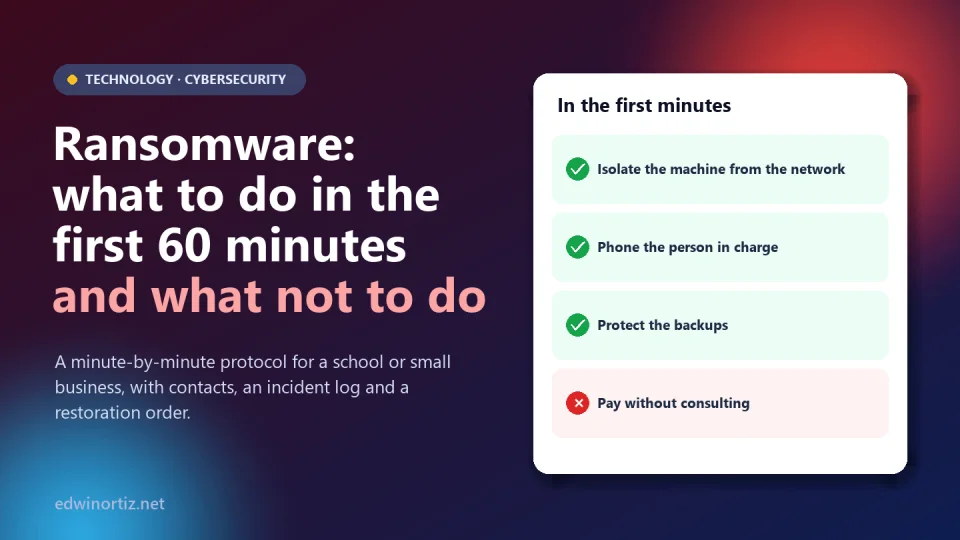
On a Monday morning, a computer in the school office shows a red screen: "Your files have been encrypted. Pay to recover them." Within minutes, other machines start to fail. What happens in the first hour decides whether the incident stays a serious nuisance or becomes weeks without grades, without billing and with students' data in the hands of extortionists.
Most schools and small businesses have no protocol: they improvise. This article proposes one for the first 60 minutes, minute by minute, based on the response checklist in the #StopRansomware guide from CISA, the FBI, the NSA and MS-ISAC, adapted to a Colombian school or small business. It includes a downloadable workbook (in Spanish) with the action list, the contacts, the incident log and the restoration order. Data verified on October 9, 2026.
Summary. In the first minutes: isolate without powering off, notify by phone (not through channels that may be compromised), protect the backups and record everything. Do not pay without advice, do not restore without verifying the backup and do not improvise communication. This is a general guide: adapt it with your IT provider and a legal adviser; it does not replace professional help.
What it is and how common it is
Ransomware is malicious software that encrypts an organization's files and demands payment in exchange for the key. Today it is common for attackers to also steal the data before encrypting it and threaten to publish it ("double extortion"); that is why restoring a backup does not always close the problem.
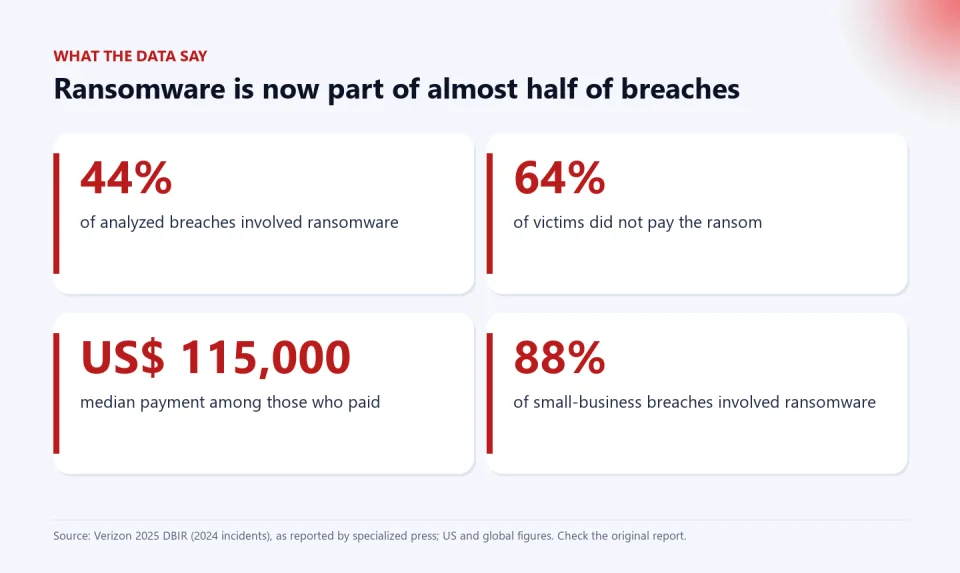
According to the Verizon 2025 DBIR (which analyzes 2024 incidents worldwide), ransomware was present in 44% of the breaches analyzed, up from 32% the year before; 64% of victims did not pay the ransom, and the median payment was about US$ 115,000. In small and medium business breaches, ransomware appeared in 88%. (Figures taken from specialized coverage of the report; check the original report.) There is no reason to believe a Colombian school or small business is out of the crosshairs: attackers tend to look for those with fewer defenses and valuable data.
The first 60 minutes
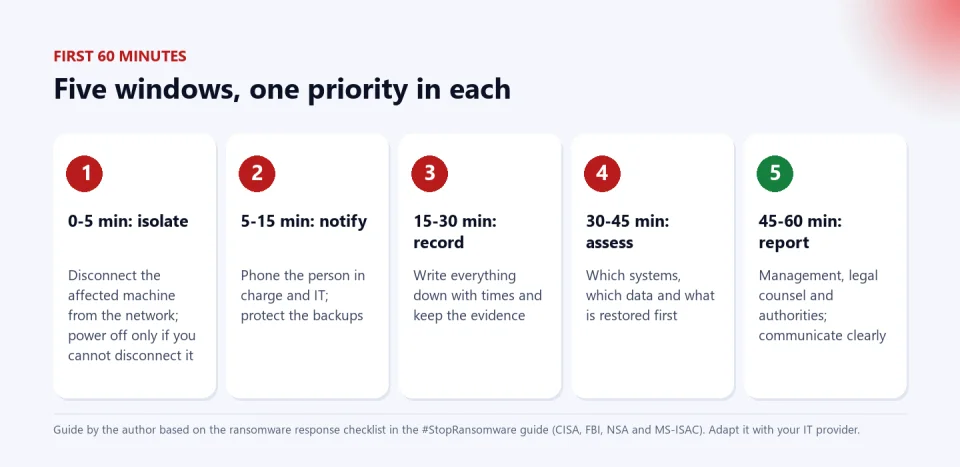
0 to 5 minutes: isolate
- Disconnect the machine from the network (cable and Wi-Fi). CISA's guide says to determine which systems are affected and isolate them immediately.
- Do not power it off, unless you cannot disconnect it: powering off can erase evidence held in memory.
- Take a photo of the screen with the ransom message. Do not answer the attackers or open anything else.
5 to 15 minutes: notify and protect
- Phone the person in charge of the incident and the IT provider. Do not use the institution's email or chat if they may be compromised; CISA's guide recommends coordinating isolation by phone so attackers do not learn they have been detected.
- If several machines are affected, disconnect that network segment (or the switch).
- Protect the backups: disconnect backup drives and close cloud storage sessions. A connected backup can be encrypted too (see the cloud is not a backup).
15 to 30 minutes: record and preserve
- Open the incident log: time, who detected it, what is seen and what was done.
- Preserve evidence: photos, names of encrypted files, logs. The guide suggests capturing system and memory images from a sample of machines; ask your IT provider or a specialist to do this.
- From a clean machine, change administrative passwords and enable two-step verification.
30 to 45 minutes: assess
- Rank systems by criticality with the "Inventario_critico" sheet: what sustains the day's operations? That is restored first.
- Ask: is personal data affected? If so, reporting obligations are triggered.
45 to 60 minutes: report and decide
- Inform management or the principal's office and the person in charge of personal data.
- Contact a legal adviser and the authorities (in Colombia, for example, the National Police's CAI Virtual; verify the current channel).
- Tell internal users what to do and what not to do, with a short message through a safe channel.
- Verify the backup in a clean environment before restoring: restoring onto a still-infected system repeats the problem.
What not to do
- Paying in a rush. CISA's guide does not recommend paying and warns that payment does not guarantee you recover your data or that it will not be leaked; it also funds criminals. Before any decision, consult the authorities and a legal adviser, who can also tell you whether a public decryptor exists for that variant.
- Powering off and restarting everything without judgment, losing evidence.
- Restoring without verifying that the backup is clean and that the entry point was closed.
- Deleting files "to clean up": it destroys evidence and can complicate recovery.
- Communicating halfway or denying the incident to those entitled to know.
The Colombian framework in a few lines
- Law 1273 of 2009: defines computer crimes; for example, computer damage (art. 269D) and use of malicious software (art. 269E) can apply to a ransomware attack. A report helps the investigation and your legal protection.
- Law 1581 of 2012: if the incident compromises personal data (for example, students' data), the data controller must report it to the Superintendence of Industry and Commerce. According to the guides consulted, the report of security incidents to the National Database Registry must be made within 15 business days of detection; confirm the current procedure and deadline on the SIC website with your adviser.
- Minors' data: its processing requires special care (see student data).
Before it happens: what changes the outcome
- 3-2-1 backup: three copies, on two different media, one offline or off the network. And test it: there is a script to verify restoration.
- Two-step verification on email, platforms and administrative accounts.
- Updates of systems, VPNs and applications; many attacks enter through known flaws.
- Least-privilege accounts: nobody should use an administrative account for daily work.
- Training against phishing, because email is still a frequent door (see basic security mistakes and cloned-voice scams).
- A drill of this protocol once a year: the first time you read it should not be the day of the attack.
Colombia, Latin America and the world
Worldwide, education and small businesses are frequent targets because they combine valuable data with limited security budgets. In Colombia and Latin America, many schools depend on a single systems person, or an outside provider, and have no written plan. For principals, the question is who decides and who answers in the first hour; for teachers and administrative staff, what to do on seeing a ransom screen (disconnect and report, do not test your luck); and for families, which of their children's data are at stake and how they would be informed. See also AI agents with access to your systems and integrations that fail silently.
Protect sensitive data by design
A school's most sensitive documents (such as students' PIARs) should not live in shared folders without control. PIAR con IA keeps them in an account with controlled access, although you must keep your own backups and rules. And the AI Exam Generator helps keep exams and their solutions in one place, instead of scattered across emails and USB drives.
Frequently asked questions
Should I power off the computer if I see a ransom note?
First disconnect it from the network. Power it off only if you cannot disconnect it, because powering off can erase evidence held in memory.
Should I pay the ransom?
US authorities do not recommend it: it does not guarantee data recovery or that data will not be leaked, and it funds criminals. Consult a legal adviser and the authorities before deciding.
Is having a backup enough?
It helps a lot, but only if it is isolated, restoring has been tested and it was not encrypted too. Also, double extortion threatens to publish stolen data.
Do I have to report the incident?
If personal data is compromised, yes, to the SIC (according to the guides consulted, within 15 business days of detection; confirm the current deadline). It is also advisable to file a report with the authorities.
How often should I practice the protocol?
At least once a year and whenever systems or the responsible staff change.
Get ready this week. Download the 60-minute protocol (in Spanish), fill in the contacts sheet with mobile numbers (not just emails), print it and keep a copy off the network. Then test your backup with the verification script.
Food for thought
When a school suffers an attack, the first victims are the students and families whose data were in its care. Who should answer when minors' data leak through an attack that could have been prevented with backups and a protocol: the IT provider, the principal's office, the governing board or the State that does not demand minimum cybersecurity standards from educational institutions? And if paying the ransom can be the quickest way out, is it legitimate to do so when it funds crime?
Was this article helpful?
React and share it with someone who might find it useful.
- Like 0
- Insightful 0
- Celebrate 0
- Love 0
- Thought-provoking 0
Prefer to have it ready?
More guides in AI and technology for teachers