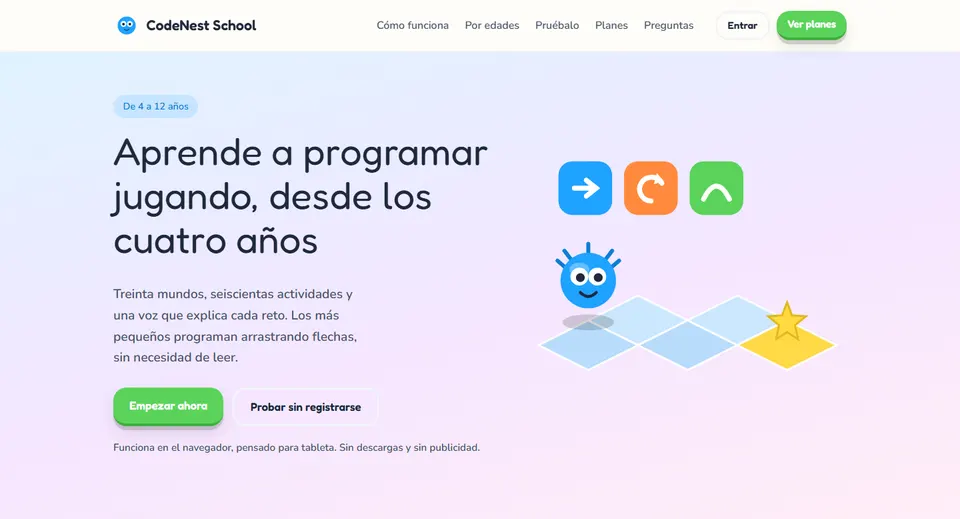
Teaching coding for kids ages 4 to 12 runs into a simple fact: a four-year-old can’t read an instruction or type a password. CodeNest School is built around that reality. Every challenge is explained out loud, the youngest children code by dragging arrows and, as they grow, they move on to blocks and then to real JavaScript or Python. In this article I explain what it is, what it includes and how to make the most of it in class with ten concrete ideas.
What is CodeNest School?
CodeNest School is a coding platform for kids developed by Grupo Logic and made in Colombia. It brings together 30 worlds, 600 activities and three age groups, with every instruction narrated by a human voice in Spanish.
It runs in the browser, with no downloads and no ads. It’s designed for tablets, with large buttons and touch-based play, although it also works on computers. Children don’t need an email address: they log in with a player name and a PIN made of four pictures.
For schools, it offers more than access to the game: there are classes with access codes, world assignments with due dates and a tracking matrix for each group, so coding can work as a full school subject.
Why teach computational thinking from an early age?
Coding is, above all, thinking in an orderly way: breaking down a problem, anticipating what will happen, testing and fixing. Those skills are very similar to what you look for in math when a child explains their procedure, or in language arts when they organize the parts of a text.
In the early years, play is the best vehicle. If the character doesn’t reach the goal, the child sees the mistake instantly and tries again. The problem is that most tools assume children can read and write. That’s why an approach that doesn’t depend on text in the early stages changes what’s possible in preschool.
CodeNest School’s main features
Three ways to code, one for each age
It isn’t the same content with a bigger font. Each group has its own way of writing a program:
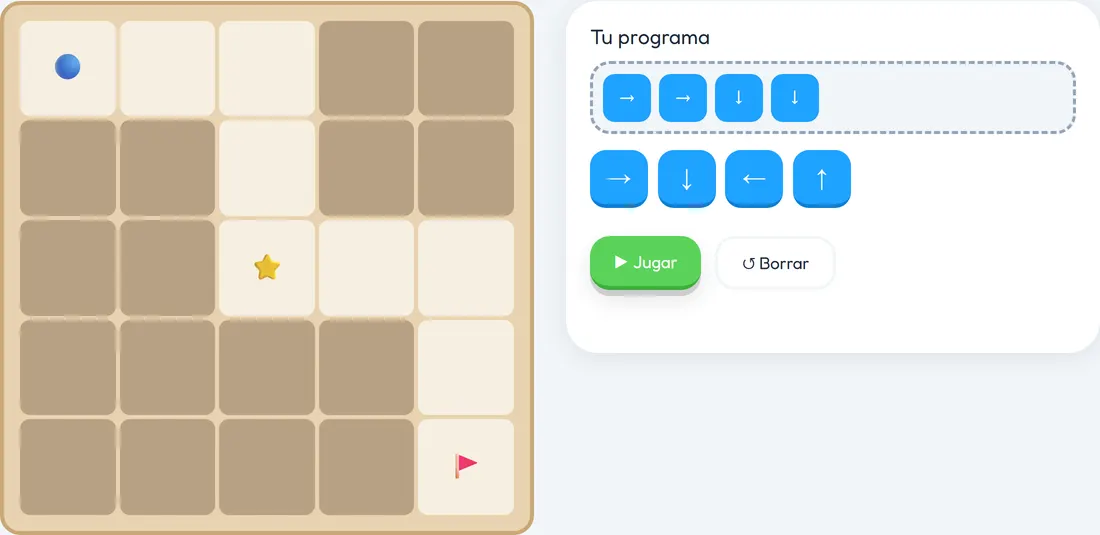
- Explorers (“Exploradores,” ages 4 to 6): they code with arrow tiles, without written words. They work on sequences, conditionals based on square color, repeating a group of actions and fixing the wrong step.
- Creators (“Creadores,” ages 7 to 9): they code with blocks and see the code they generate alongside. They tackle counted loops, conditionals, variables, their own functions, logical operators, lists and debugging programs with several errors.
- Hackers (ages 10 to 12 and up): they write JavaScript or Python in a real editor, with autocomplete and error warnings. They get as far as arrays, objects, for loops, events, error handling and search, sorting and pathfinding algorithms.
Every challenge, read out loud
Instructions are narrated by a human voice in Spanish. The megaphone button repeats them as many times as needed, with no penalty.
Large tiles and pieces introduced gradually
The arrows are chunky, designed for small fingers, and the first ten worlds don’t contain a single written word. Children start with four arrows; loops, conditionals and functions arrive once the child has mastered what came before.
Three stars and mistakes without punishment
Each activity awards three stars: one for reaching the goal, another for collecting everything and the third for doing it with the shortest program. If the program fails, the character crashes in a funny way and encourages the child to try again; a red error message never appears.
Tracking and tools for schools
There’s a report for each student showing their progress by world, the time spent and the activities where they get stuck. The School plan adds unlimited students and teachers with their own dashboard, multiple campuses, bulk student enrollment, assignments by class, recorded guardian consent and auditing of access to minors’ data, in accordance with Colombia’s data protection law (Law 1581 of 2012).
10 ideas for using CodeNest School in the classroom
These ideas combine the platform with classroom routines you already use. Take them as a starting point and adapt them to your context.
1. An explorers’ corner with headphones (preschool, ages 4 to 6)
Set up a corner with two or three tablets and headphones as part of your usual center rotation. Show them the megaphone button just once: “if you didn’t understand, tap it again.” Since there’s no text in the first worlds, children work independently while you attend to other centers. Rotations of 10 to 15 minutes are enough.
2. A giant grid on the floor (kindergarten and grade 1, math)
In the first-world demo, each arrow makes the character roll until the path runs out. Recreate that rule with a tape grid on the floor: one child is the character and the group lays down arrow cards. Before “running” the program, everyone predicts where the character will stop. You’re working on spatial awareness, directions and prediction; later, on the tablet, the mechanics already feel familiar.
3. Colored boards for conditionals (ages 4 to 6, art)
The Explorers work on conditionals based on square color. Lay the groundwork in art class: each team paints a board of squares with tempera and agrees on a simple rule, such as “if you step on red, you turn.” Then they play on their own boards. When they reach those activities on the platform, the idea of “if this happens, I do that” will already make sense.
4. Hunting for the third star (grades 1 to 4, math)
The third star requires the shortest program. Turn that into a class challenge: on the board, a table with each pair’s name and how many instructions they used for an activity. Who used the fewest? Which steps were unnecessary? Comparing quantities, counting and reasoning is pure math, and you’re also introducing the idea of optimization.
5. Bug hunters (Creators, ages 7 to 9)
Take advantage of the fact that failing isn’t punished. Start a “bug of the week”: when a pair finds and fixes a mistake, they share it with the class in one minute. With the Creators, who debug programs with several errors, ask them to write in their notebook what they expected, what happened and what they changed. That way you normalize mistakes as part of learning.
6. Reading code out loud (ages 7 to 9, language arts)
The Creators see the code they generate next to the blocks. Use that panel in language arts: ask them to “translate” a program into complete sentences, with sequence and condition words (“first,” “while,” “if… then”). They’re reading and writing an instructional text and, at the same time, getting ready to write code.
7. Functions as choreography (ages 7 to 9, art and music)
Before creating their own functions, have the group invent a four-move “greeting function” and give it a name. Then put together a short song where the chorus “calls” that function several times. The children understand that a function is a named sequence that gets reused, and later carry that idea over to the blocks.
8. Pair programming with JavaScript or Python (ages 10 to 12)
With the Hackers, use the roles of driver (types) and navigator (reads, suggests and reviews), switching every 15 minutes. The real editor with autocomplete and error warnings helps, but the navigator must explain why they suggest each line. Close with a round of “refactor to use less”: can it be solved with less code?
9. Routes on a science map (grades 5 and 6, natural science)
When the search and pathfinding algorithms come up, draw an ecosystem on a grid: a bee has to visit three flowers and return to the hive. Teams look for the shortest route on paper and compare. They talk about pollination while practicing the reasoning behind pathfinding; afterward they take it to the activities on the platform.
10. Challenges with due dates and formative assessment (all ages)
Each week, assign a world or specific activities to each class, with a due date. The student-by-world matrix shows you where the group gets stuck: that activity becomes the mini-lesson for the following Monday. Add an exit ticket to find out what they understood, because time spent doesn’t always reflect understanding.
How to get started, step by step
- Try the demo on the CodeNest School website, which you can play without signing up.
- Choose a plan with your school: School (“Escuela”) for schools, or Personal and Parents (“Personal” and “Padres”) for families.
- Create your classes; each one gets its own access code.
- Upload your student list all at once with bulk enrollment.
- Practice logging in with the player name and picture PIN during the first session.
- Assign worlds or activities by class, with a due date.
- Review the tracking matrix every week and take advantage of the initial training included in the School plan.
Best practices and precautions
- Screen time: short sessions in preschool and a mix with unplugged activities in every grade.
- Children who can’t read yet: the voice and the arrows give them independence, but your support during the first sessions is still key.
- Inclusion: the large tiles help small fingers; form mixed-ability pairs and respect different paces.
- Stars without rankings: celebrate each child’s improvement, not just whoever collects the most stars.
- Minors’ data: let families know that guardian consent is recorded and that data access is audited.
- Choose wisely: before deciding, take a look at these pros and cons of technology tools for teachers (in Spanish).
Frequently asked questions
Can a four-year-old use it without knowing how to read?
Yes. The first ten worlds have no written words: children code with arrow tiles and every instruction is narrated by a human voice, which the child can replay by tapping the megaphone.
What do students learn at each stage?
Sequences and conditionals from ages 4 to 6; loops, variables and functions with blocks from 7 to 9; and real JavaScript or Python from age 10, all the way up to pathfinding algorithms and error handling.
Do you need to install anything?
No. It runs in the browser, on tablets and computers, with no downloads.
What student data is stored?
The bare minimum: a player name and a picture PIN, with no email. Guardian consent is recorded, access to minors’ data is audited, and there are no ads or third-party trackers.
How is it different from Codexia?
CodeNest School focuses on coding, with three age-based stages and Spanish voice narration for every challenge. Codexia spans ten subjects, including math, logic, artificial intelligence and physics, with more than 200 games.
Conclusion
CodeNest School solves one of the biggest obstacles to teaching coding in preschool: reading. With Spanish voice narration, text-free arrows and a clear progression all the way to real code, it lets you build a computational thinking path from ages 4 to 12. From age 12, the path can continue with VCodePro. Find out all the details on the official CodeNest School page and explore more resources in AI for teachers.
Prefer to have it ready?
More guides in AI and technology for teachers