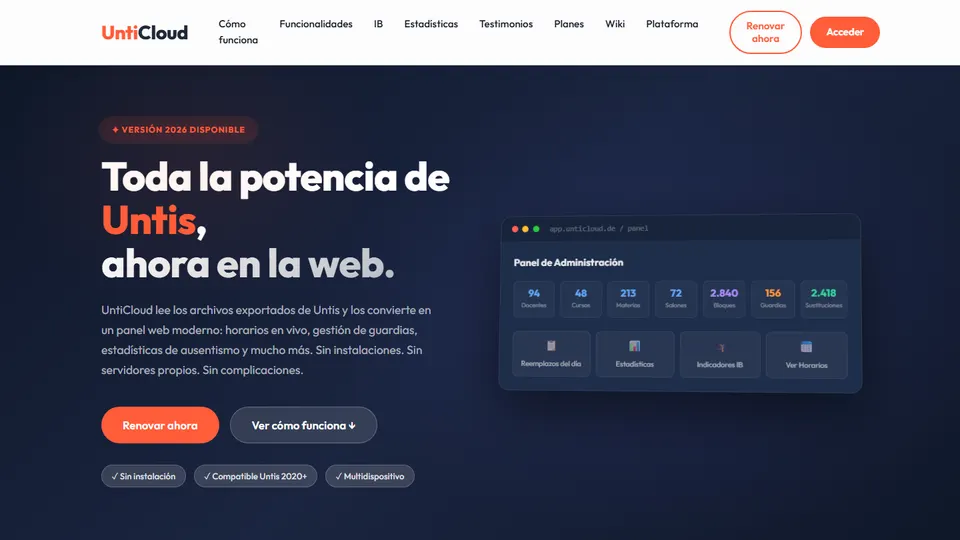
If your school builds its timetables in Untis, you probably know the scene: the timetable lives on the coordinator’s computer, teachers work from a printout that has already changed twice, and the day’s substitutions get sorted out through phone calls and hallway conversations. UntiCloud is Grupo Logic’s web software that takes the files Untis already generates and publishes them on an online dashboard: real-time timetables, break duty, substitutions and teacher absenteeism indicators, each one visible to the role that needs it. In this article I’ll explain what it is, what problem it solves and, above all, how you can use that information to plan your classroom work better.
What is UntiCloud?
UntiCloud is a 100% web-based platform that works as the “online layer” of Untis. It doesn’t replace Untis or change the way your coordination team plans: it reads the GPU files that Untis Desktop already exports (version 2020 or later) and turns them into a dashboard that teachers and school leaders can open from their phone, tablet or computer.
There’s nothing to install on the school’s computers and no need to set up your own servers. Importing takes a single click, with no duplicates and a full audit trail, and the sections that already exist in Untis (IB, high school, primary…) are recognized automatically.
What problem does it solve at school?
The challenge isn’t planning the timetable, because Untis already does that well. The problem is what happens afterwards:
- The information is locked away on a single computer, and teachers depend on printed timetables.
- Substitutions are coordinated by phone, with the risk of a class being left without a teacher.
- The principal’s office doesn’t have the month’s teacher absenteeism rate at hand.
- Calculating that rate, checking the hours for each IB subject or preparing a report for the board takes hours of manual work in spreadsheets.
If you’ve ever put together a summary like that in Excel, you know how easy it is to get a formula wrong; in fact, I wrote about that in how to automate tasks in Excel and reduce errors (in Spanish). UntiCloud tackles exactly that repetitive work: the data comes out of Untis and reaches the dashboard already calculated.
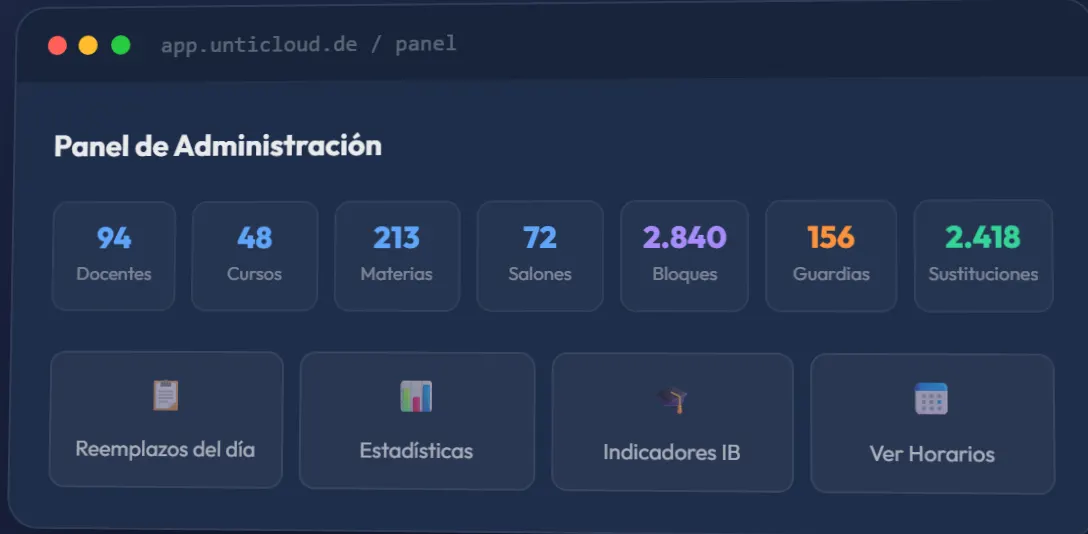
Main features
Real-time timetables
Views by teacher, by class and as a weekly agenda, updated instantly and available on any device. No more asking “which timetable is the current one?”
Break duty
Each teacher can see which day and which area they’re assigned to supervise. The assignment comes straight from Untis, with nothing to reconfigure.
Substitutions and planning
The day’s substitutions with a printable PDF, teacher availability for planning absences, and a history broken down by reason.
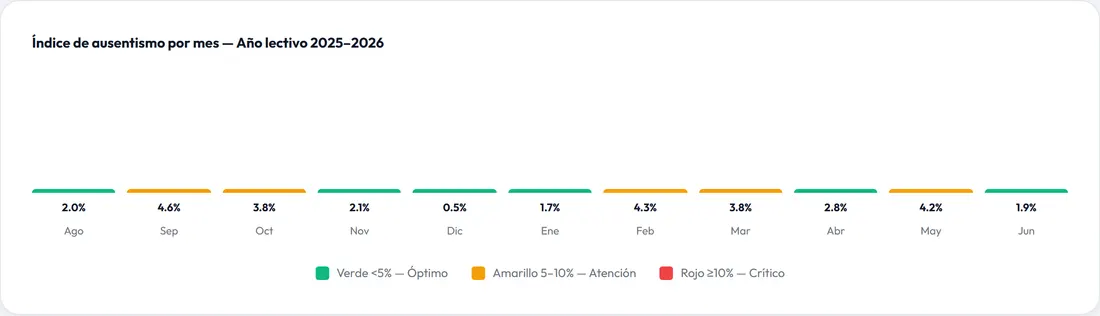
Absenteeism statistics
Teacher absenteeism rate by month, by reason and by class, with a filter by section. One important detail: it’s calculated only on the hours the teacher was supposed to teach, not on the full working day.
Comparison tool and teaching load
You can compare up to four teachers or four classes side by side and look up each teacher’s weekly load: lessons, groups, subjects and rooms.
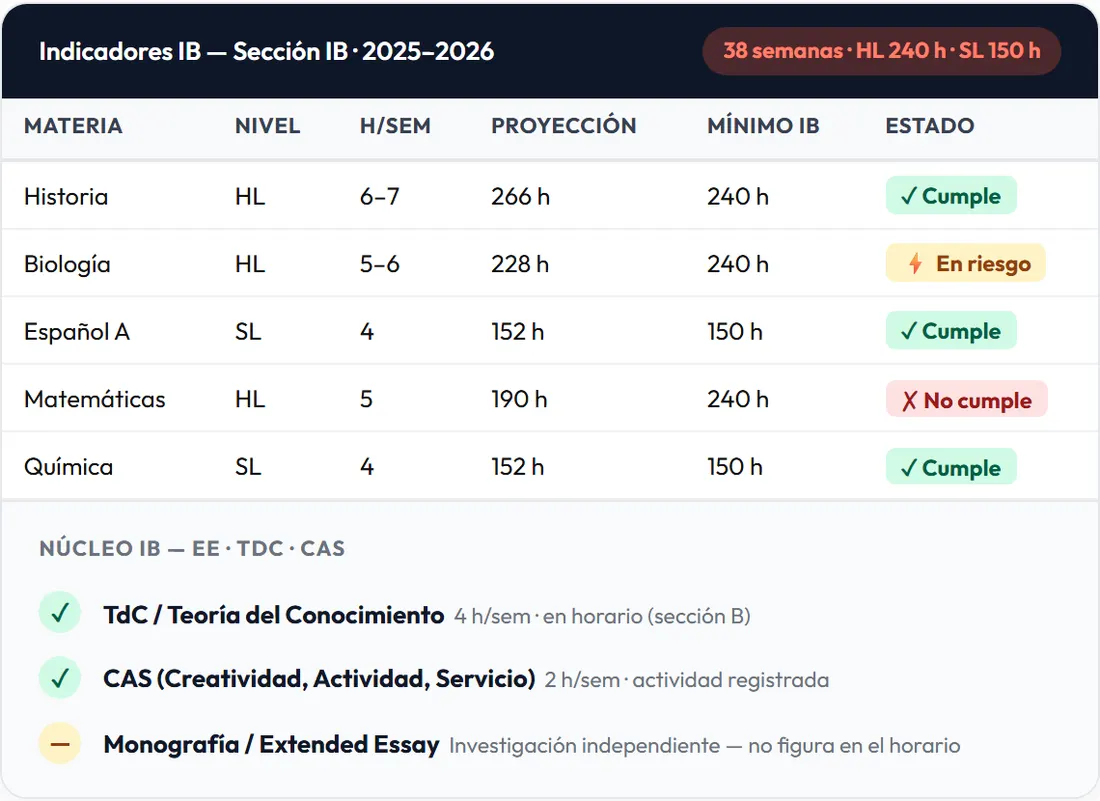
IB indicators
For International Baccalaureate schools: compliance with HL and SL hours against the programme minimums, tracking of the core (Extended Essay, Theory of Knowledge and CAS) and hours lost in the IB section. This module is included in the Professional and School Network plans.
Ideas for using UntiCloud in the classroom and in your planning
UntiCloud is a school management tool, so you won’t be projecting it in class. Its value for teachers lies elsewhere: having the right information on time so you can plan better. Here are concrete ideas depending on your role.
1. Teachers: start the day by checking your timetable and duties on your phone
Before you leave home, check your timetable for the day and the break area you’re supervising. If a substitution has been assigned to you, you already know which class you’re covering and can bring the materials ready. It may seem minor, but it saves you the 6:45 a.m. dash to find the sheet pinned up in the staff room.
2. Subject departments: a bank of worksheets for substitution periods
A well-run substitution isn’t just “keeping an eye on the class.” Suggest to your department that each teacher leave a self-guided worksheet for each grade in a shared folder. When the coordinator publishes the day’s substitutions in UntiCloud, whoever covers the period knows the class and the subject and only has to open the matching worksheet. For example, the math department could keep a set of proportionality problems for 7th grade ready for any absence.
3. Academic coordination: assigning substitutions with pedagogical criteria
The teacher availability view shows who is free at that time. Use it to choose, whenever possible, a teacher from the same subject area or one who already knows the group. Then print the day’s substitutions PDF for the staff room and the front desk, or share it through your internal channels.
4. Homeroom teachers: find out whether your class is losing hours
UntiCloud also calculates absenteeism by class. If you’re the homeroom teacher for 10A, ask the coordinator for your group’s figures: if it’s piling up missed hours in one subject, you have objective data to discuss with the subject teacher and the coordinator. Which topics were cut short? Is a review session needed before the end-of-term test?
5. Teachers of the same grade: find common free periods to plan together
The comparison tool lets you view up to four timetables side by side. If the science, language arts and social studies teachers for 8th grade want to meet to design a project, the coordinator can compare their timetables and instantly spot the free periods they share. It’s the fastest way to schedule professional learning communities without sacrificing class time.
6. Cross-curricular projects: cross-check the timetables of the classes involved
For a field trip, a science fair or an environmental project day, compare the timetables of the participating classes. That way you can see which subjects are affected and let the teachers know in advance, instead of finding out on the day.
7. Coordination: distribute teaching loads and duties fairly
The teaching load view shows each teacher’s lessons, groups, subjects and rooms. It’s an objective basis for team conversations: who has too many groups, who could take on more supervision duties or a homeroom, and how to balance the next round of teaching assignments.
8. Principal and academic council: plan professional development with data
The history by reason shows which types of absence weigh most over the year. If some of the hours not taught are due to training sessions or school events held during class time, the academic council can move them to professional development days and protect classroom time. The month-by-month trend also helps you anticipate the critical months on the calendar.
9. IB coordination: check the traffic light before it’s too late
The IB Indicators module projects weekly hours across the school year and compares them with the HL and SL minimums, using a traffic light that shows whether each subject meets the minimum, is at risk or falls short. Check it at the start of the year and after every timetable change: if HL Biology shows up as at risk, there’s still time to reorganize blocks.
10. 9th-grade math teachers: the logic of the rate as a classroom problem
Here’s an idea from one math teacher to another. The absenteeism rate is a ratio: hours not taught over hours that should have been taught. Using made-up data (never real data about colleagues), you can give 9th graders a problem on percentages, rates and reading bar charts with color-coded thresholds. It’s statistics applied to something students experience every day.
How to get started, step by step
- Choose your plan. Institution, Professional or School Network (“Red de Colegios”), depending on the size of your school and the modules you need (for example, if you run an IB programme).
- Activate your license. You’ll receive access to your institution’s admin dashboard.
- Import from Untis. The IT coordinator uploads the GPU files that Untis Desktop already exports; the import takes less than five minutes.
- Set up roles and open access. Decide what the principal, each coordinator and each teacher can see, and share the login details with the team.
- Agree on a routine. Decide who imports the changes, what time substitutions are published and when the statistics are reviewed by the academic council.
Good practices and precautions
- Absenteeism data is sensitive. Use it to improve how the school is organized, not to single anyone out. Take advantage of the fact that each role sees only what it needs, and don’t share screenshots with names outside official school channels.
- A number doesn’t tell the whole story. Behind every sick leave there’s a person. Read the indicators together with their context before drawing conclusions.
- Quality depends on Untis. If absence reasons or sections aren’t recorded properly in Untis, the statistics will show it. Agree on clear codes from the start.
- Import regularly. A “real-time” timetable is only real-time if changes are imported as they happen.
- Check the import history. Any errors detected show up there; dealing with them promptly avoids surprises.
If you’re evaluating several platforms for your school, you may find my analysis of technology tools for teachers: pros and cons (in Spanish) useful.
Frequently asked questions
Do we have to change the way we plan in Untis?
No. UntiCloud works with the GPU files that Untis Desktop already exports, so the coordination team keeps planning exactly as before.
Which version of Untis is required?
Untis 2020 or later.
Do we need to install anything on the school’s computers?
No. UntiCloud runs 100% on the web, with no installation and no servers of your own; teachers and school leaders log in from any device with a browser.
Does every user see all the information?
No. Each role sees only what it needs: the principal sees the overall picture, coordinators see their management tools, and each teacher sees their own timetable, duties and the substitutions assigned to them.
How is the teacher absenteeism rate calculated?
UntiCloud calculates it only on the hours the teacher was supposed to teach and didn’t, and lets you view it by month, by reason, by class and, depending on the plan, filtered by section.
Is the IB Indicators module included in every plan?
No. IB Indicators is included in the Professional and School Network plans.
Conclusion
UntiCloud doesn’t change how the timetable is made; it changes what the school can do with it. For teachers, it means less uncertainty every morning; for homeroom teachers and coordinators, it means data to protect students’ learning time. If your school already works with Untis, it’s worth a look on the official UntiCloud page. And if you’re interested in the educational use of artificial intelligence, also check out AulaMágica IA and the AI and technology for teachers hub.
Prefer to have it ready?
More guides in AI and technology for teachers