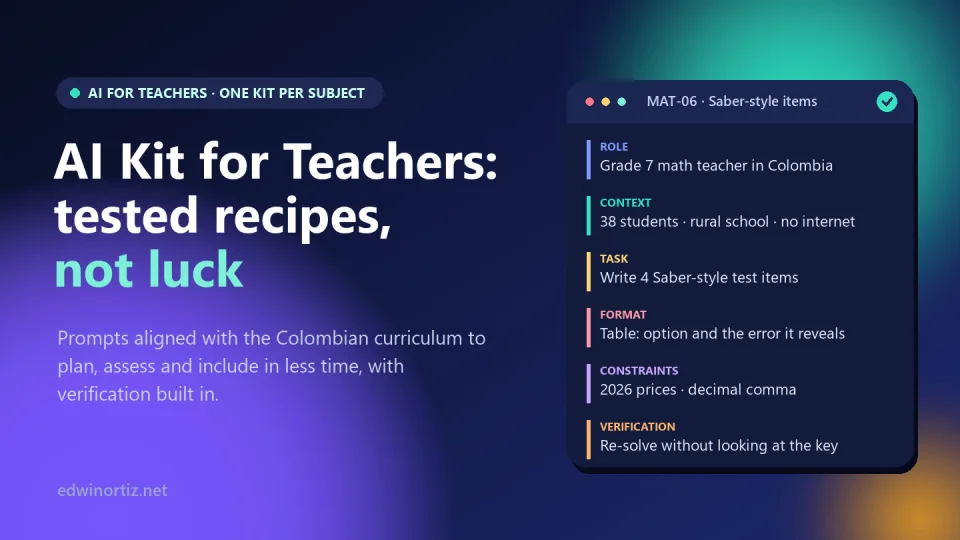
You have probably been there. You ask an AI assistant for ten Saber-style questions on proportional reasoning for your seventh graders, and thirty seconds later you have a test. Over the next hour and a half you discover that two answer keys are wrong, one question has two correct answers, the prices are in dollars and the “DBA 7” it cites says nothing of what the AI claims. You end up redoing almost everything. AI does save time, just not for people who ask in a hurry.
After more than twenty years teaching math and technology in Colombia, and many hours testing prompts to plan, assess and adapt lessons, I reached a conclusion I now share in every workshop: the difference between losing and saving time with AI lies in the method, not the tool. In this article I explain that method, show where AI goes wrong in each subject and describe how I turned it into a kit of recipes designed for Colombian classrooms. A note before we start: the kit itself is written in Spanish, for teachers who work with the Colombian curriculum or teach in Spanish.
Asking ChatGPT is not the same as working with AI
An AI assistant is a very convincing text generator. When you ask it to “make a fractions worksheet for sixth grade,” it fills the gaps with whatever is most likely based on what it read online, and the most likely answer is almost never your school: a class of 38 students, no internet in the room, the national grading scale set by Decree 1290 and a curriculum organized around Colombia’s Basic Competency Standards (Estándares Básicos de Competencias) and Basic Learning Rights (DBA, Derechos Básicos de Aprendizaje).
The result has three problems any teacher will recognize:
- It is generic. It works for any country, so it doesn’t quite work for yours: gray squirrels in science class, Thanksgiving in English class, “states” and “amendments” in social studies.
- It is confident even when it is wrong. AI doesn’t hesitate: it makes up DBA numbers, cites constitutional articles that say something else and delivers answer keys without solving the items.
- It doesn’t arrive in a usable format. You get paragraphs you have to turn into a table, worksheet or rubric, and that is where much of the time you thought you saved goes.
None of this means AI is useless. It means you have to give it what it lacks: your context, your standards and a way to check itself.
The anatomy of a prompt that actually works
A good prompt for AI looks like a good assignment for a student: it says who should act, in what situation, what to produce, how to deliver it and how to know it is right. I work with six parts:
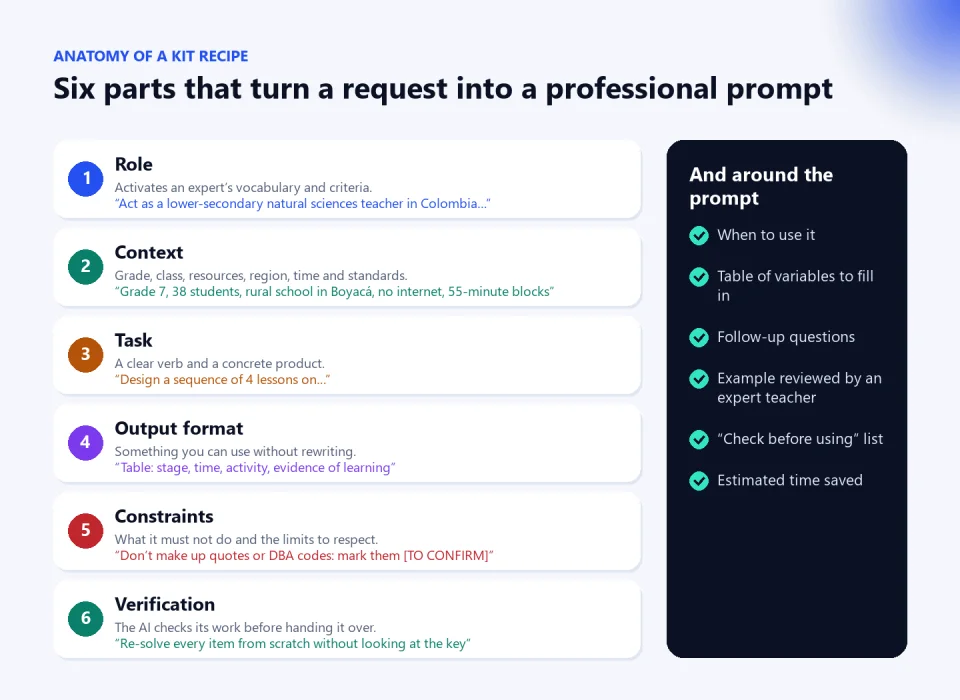
- Role: activates an expert’s vocabulary and criteria. “Act as a lower-secondary natural sciences teacher in Colombia, experienced in competency-based assessment.”
- Context: grade, number of students, resources, region, available time and curriculum references. It is the part most often left out and the one that changes the result the most.
- Task: a clear verb and a concrete product. “Design a sequence of four lessons,” not “help me with the cell.”
- Output format: what you need to use it without rewriting. “A table with stage, time, activity and evidence of learning.”
- Constraints: what it must not do. “Don’t make up quotes, data or DBA codes; if you are not sure, mark it [TO CONFIRM].”
- Verification: forces the AI to check its work before handing it over. “Re-solve every question from scratch without looking at the key and confirm it matches.”
Compare. Weak prompt: “Make me a fractions worksheet for sixth grade.” Professional prompt: “Act as a grade 6 math teacher in Colombia. My class confuses fractions as part of a whole with fractions as ratios. Design a 50-minute worksheet with three stages (exploration with hands-on materials, guided practice and a challenge), in a table, with Colombian contexts and prices in pesos, and verify every answer at the end.” The second takes one more minute to write and saves an hour of corrections.
The problem is that writing prompts like this for every task, grade and term also takes time. That is where a system makes the difference.
From loose prompts to recipes: what I built
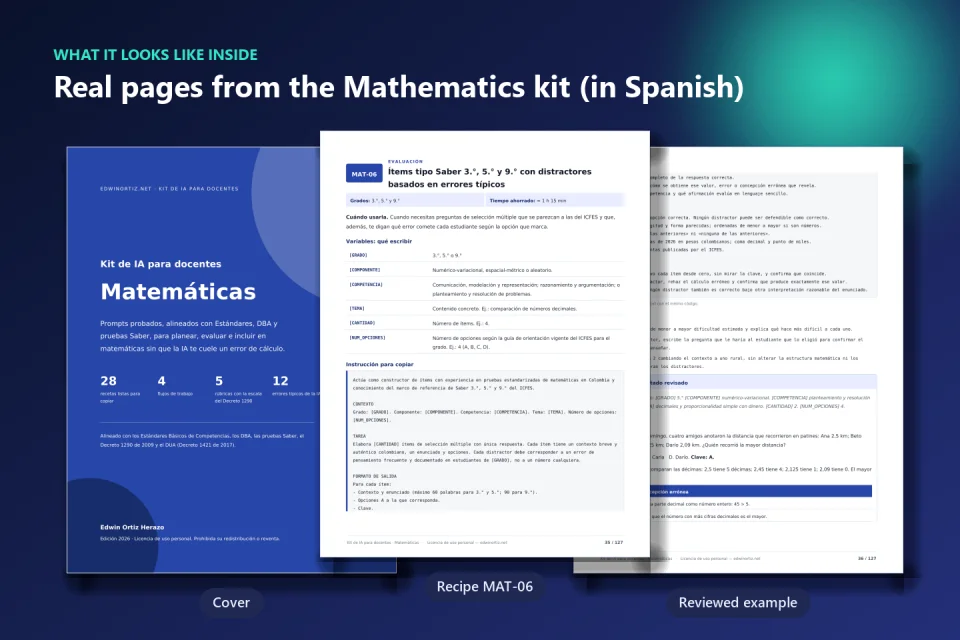
With that idea I put together the AI Kit for Teachers: not a list of “magic prompts,” but a working system for each subject in which every prompt is already written, tested and paired with what you need to use it well. I call them recipes because, as in cooking, they come with ingredients, steps and a way to tell whether it turned out right. Each one includes:
- Code, grades and estimated time saved, so you can find it quickly in the PDF and in the text file.
- When to use it: the specific classroom situation it was designed for.
- A table of variables: what goes in brackets, such as [GRADE], [COMPONENT] or [TOPIC], with an example of what to write.
- The full prompt with all six parts, ready to copy.
- Follow-up questions, because the first answer is rarely the best one.
- A sample output reviewed by an experienced teacher, so you know what something usable looks like.
- A “Check before using” list with the errors AI tends to make in that task.
A real example: recipe MAT-06, “Saber-style items for grades 3, 5 and 9 with distractors based on typical errors.” Its reviewed example includes this grade 5 item: “At the corner store, a pound of panela (unrefined cane sugar) costs 3,400 pesos. Mariana buys three and a half pounds. How much does she pay?” The key is 11,900 pesos, and every distractor is explained: 10,200 shows the student ignored the half pound; 11,700, that they miscalculated half of 3,400; 13,600, that they rounded 3.5 up to 4 for no reason. That is no longer just a question: it is a diagnostic tool.
Where the time is saved
The recipes are organized into six categories that match what really eats up a teacher’s hours: planning, assessment, adaptation, resources, feedback and admin. Each one comes with an estimate of the time saved compared with doing the task from scratch.
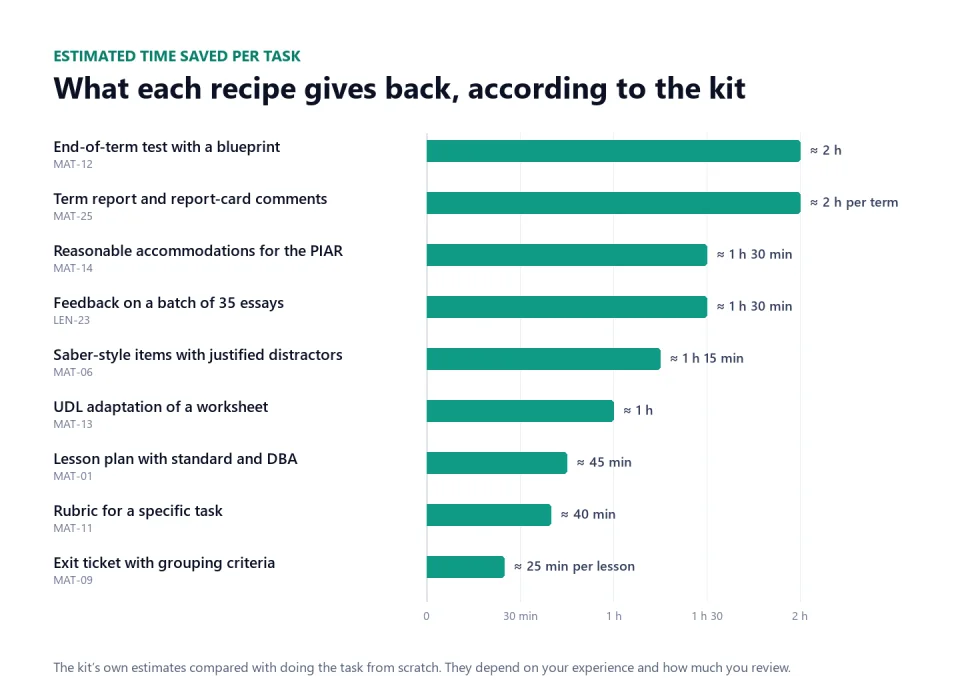
I want to be honest about those figures: they are estimates and depend on your experience and how much you review. What I am sure of is where the big savings are. They don’t come from “writing faster,” but from not having to fix what the AI got wrong. An end-of-term test with a blueprint (MAT-12) or the term report with report-card comments on the Decree 1290 scale (MAT-25) are two-hour tasks that turn into three with a poorly written prompt.
And a warning I repeat in every workshop: the time AI gives back shouldn’t go into making more worksheets. Spend it on what no machine does: talking to the student who is falling behind, reviewing calmly, planning with your team.
Where quality is gained: the teaching side
Real curriculum alignment
AI knows the Colombian standards and DBA only “by hearsay.” That is why the recipes ask you to paste the official text of the standard and DBA you are working on, and forbid inventing codes: anything it can’t confirm is marked [TO CONFIRM]. Each kit also has a chapter explaining the subject’s references in plain language: the Basic Competency Standards, the DBA, the competencies and components of the national Saber tests and, depending on the subject, the Ministry of Education’s Guide 30 for technology or Guide 22 and the Common European Framework of Reference (CEFR) for English.
Assessment that informs
A multiple-choice question with random distractors only tells you who got it right. One whose distractors are built from thinking errors tells you why each student got it wrong. The assessment recipes require that, plus a test blueprint when it is a full exam. Each kit also includes a bank of four or five rubrics using the national scale (Superior, Alto, Básico and Bajo). In the math problem-solving rubric, for example, the “Verification” criterion distinguishes between a student who checks with another method (Superior) and one who “hands in impossible results, such as fractional people or absurd prices, without noticing” (Bajo). These are descriptors you can observe.
Inclusion from the planning stage
Each kit includes a chapter on Universal Design for Learning and on the reasonable accommodations of the PIAR (Colombia’s Individual Plan of Reasonable Accommodations, under Decree 1421 of 2017), six shared prompts for any subject (such as turning a text into easy-to-read language or adapting a test without changing what it measures) and subject-specific recipes: a science reading at three levels, accessible materials for blind or low-vision students, written Spanish as a second language for deaf students who use Colombian Sign Language, or multigrade planning in the style of Escuela Nueva, Colombia’s rural school model. If what you need is to draft a student’s full document, the site’s AI-powered PIAR tool (in Spanish) is built for that; and for the full background, I wrote about what an effective PIAR needs.
Feedback that helps
Generic feedback (“good job, work on your spelling”) is one of the typical errors the Spanish Language Arts kit teaches you to catch. The feedback recipes ask for comments along the lines of “what you already do well” and “your next step”; in English, error codes that don’t rewrite the student’s text; and in technology, graduated hints for debugging code without giving away the solution.
Where trust is gained: the technical side
Chained workflows
Asking AI for everything at once (“make me the unit, the test and the adaptations”) lowers the quality. Chaining works better: first the plan, then the assessment aligned with that plan and then the adaptations. Each kit includes four or five workflows like this. One of the math ones, “Complete proportional reasoning unit,” runs through six steps over three weeks with the neighborhood store as a common thread: plan the first lesson, extend it into a sequence, close each session with an exit ticket, build a bank of tiered problems, analyze the errors on the unit test and deliver feedback and a remediation plan.
Verification against AI errors
For me, this is the kit’s greatest value. AI doesn’t make the same mistakes in every subject, so each kit lists its twelve typical errors, with how to spot and fix them. Some examples taken from the kits:
- Mathematics: solving 2x² = 18 and keeping only x = 3; using a decimal point and comma thousands separators, the opposite of Colombian notation; writing items with two correct options.
- Spanish Language Arts: making up quotes from literary works or attributing them to the wrong author.
- Natural Sciences: explaining Colombia’s tropical climate with four seasons, or claiming water always boils at 100 °C regardless of pressure.
- Social Studies: calling the colonial territory “Colombia” or importing US civics.
- English: translating tinto (Colombian black coffee) as red wine, or including listening items in the Saber 11 English test, which has no listening section.
- Technology and Computing: writing English formulas for a Spanish-language Excel or proposing LED circuits without a resistor.
On top of that comes a general list of eleven checks, from curriculum alignment to authorship, and practical habits: ask for every calculation step by step, compare the answer in two different assistants, and work with official documents using tools that answer only from the PDF you upload.
Student privacy
Everything you type into an assistant leaves your computer and is processed on servers that are almost always outside Colombia. The kit’s rule is simple: AI works with teaching situations, never with identifiable people. The privacy chapter explains what Colombia’s data protection law, Law 1581 of 2012 (in Spanish), requires (health data is sensitive, and data about children and adolescents has reinforced protection), how to anonymize with aliases like “S1” and by describing barriers instead of diagnoses, and how to stop your conversations from being used to train models.
A use agreement with your students
Your students already use AI. The kit proposes a classroom agreement built around a traffic light: red, no AI; yellow, AI as declared support; green, AI built into the task and assessed on how well it is used. It includes a model agreement and a warning I share: “AI detectors” have high error rates and are not enough evidence to sanction anyone.
Loose request vs. curated recipe
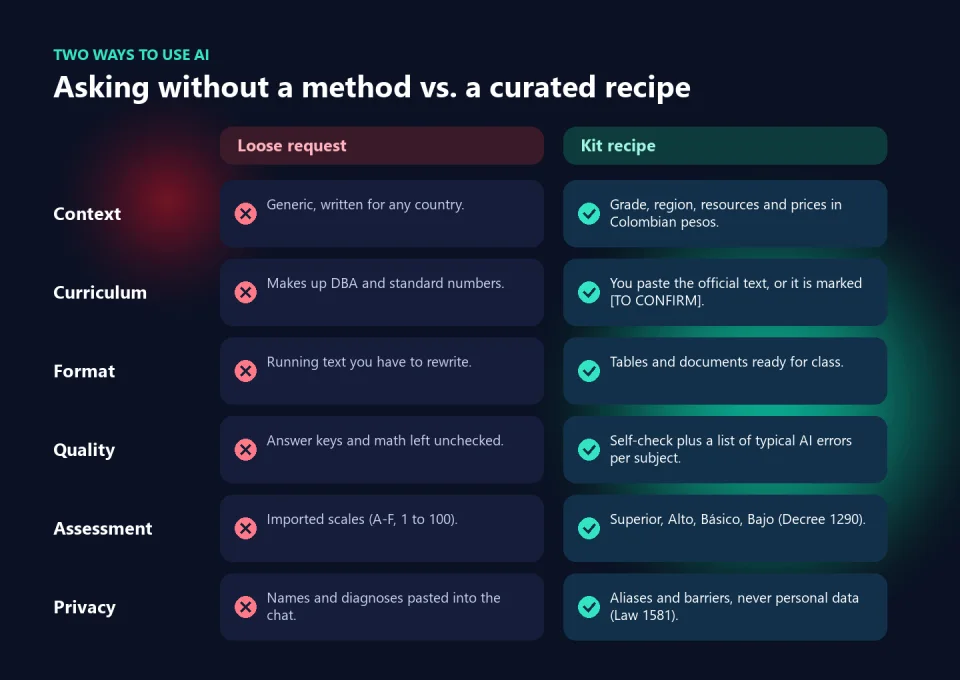
| Aspect | Loose request | Kit recipe |
|---|---|---|
| Context | Generic, any country | Grade, region, resources and prices in pesos |
| Curriculum | Made-up DBA numbers | Official text pasted in or marked [TO CONFIRM] |
| Assessment | Imported scales | Superior, Alto, Básico and Bajo, with ready rubrics |
| Quality | Unchecked answer keys | Self-check and twelve typical errors per subject |
| Example | None | Output reviewed by an experienced teacher |
| Contexts | Stereotypes or foreign realities | A bank of about 28 authentic Colombian contexts |
That last point deserves one more line. The math context bank, for example, includes the neighborhood store with credit jotted down in a notebook, utility bills with subsidies by socioeconomic stratum, coffee harvests paid by the kilo and Sunday ciclovía bike routes. Problems like these don’t feel imported, and students notice.
Six subjects, one kit each
The kit is sold per subject because AI’s mistakes in math are not the ones it makes in English or social studies. There are six: Mathematics, Spanish Language Arts, Natural Sciences and Environmental Education, Social Studies, English (as a foreign language, with instructions in Spanish) and Technology and Computing. Each covers kindergarten to grade 11 and includes 27 or 28 recipes, workflows, rubrics, twelve typical errors, the context bank and the shared chapters on UDL and the PIAR, privacy, the classroom agreement and a glossary.
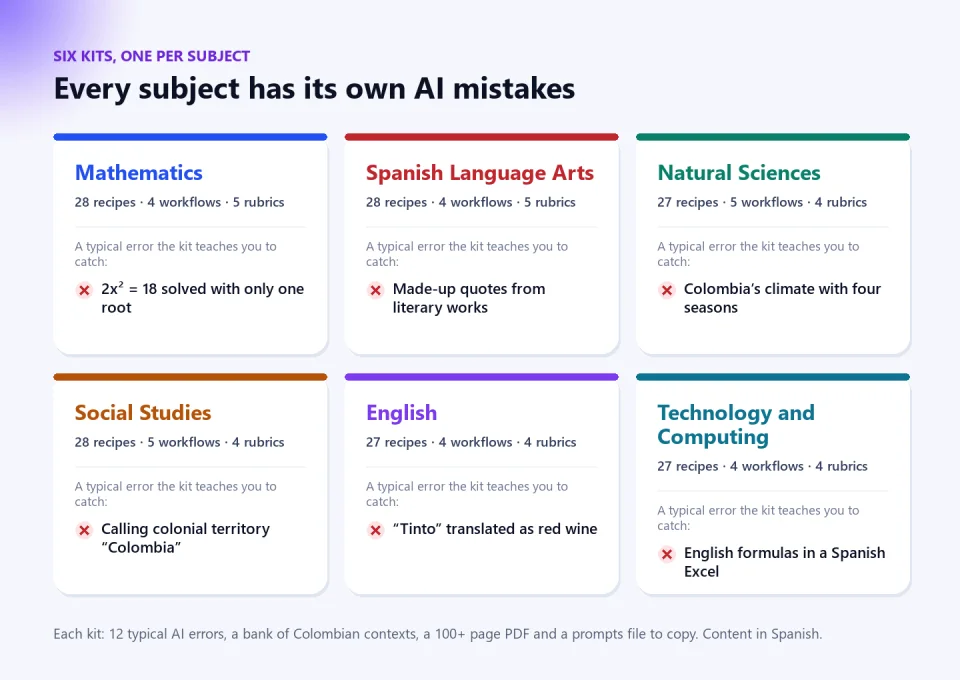
You receive a ZIP with a printable PDF of more than a hundred pages and a text file with every prompt ready to copy and paste, without the odd line breaks that sometimes appear when copying from a PDF. The recipes work in ChatGPT, Gemini, Claude or Copilot, including their free versions. Everything is in Spanish: the prompts are written to get Spanish-language materials for Colombian classrooms.
What the kit doesn’t do
I prefer to be clear. The kit doesn’t replace your judgment or excuse you from reviewing: it is designed so that AI becomes a fast, reliable assistant and so you always know what to check before taking something into the classroom. Some data, such as prices or fares, change over time and should be updated in the corresponding variable. And the final document is yours: you sign it and you answer for it.
Conclusion
AI won’t teach better lessons for us, but it can take off our hands the mechanical part that steals our afternoons and Sundays. The condition is working with a method: Colombian context, real standards, a usable format and a verification step that catches errors before they reach the student. That is what I tried to package into every recipe. If you want to keep exploring, AulaMágica IA has more ideas for using artificial intelligence in the classroom, and my analysis of PISA results in Latin America explains why the quality of what we assess matters so much.
AI Kit for Teachers, by subject. You choose your subject at checkout and receive its full kit: 27 or 28 recipes with reviewed examples and checklists, workflows, rubrics on the Decree 1290 scale, the typical AI errors in your subject and a bank of Colombian contexts, as a printable PDF and a prompts file ready to copy. The content is in Spanish and designed for the Colombian curriculum. Each subject costs 60,000 Colombian pesos (USD 15), and you can add several to the same order.
A question to close
When a student hands in their work, we don’t only ask what they answered, but how they got there and how they know it is right. We demand method and verification. If that is what we ask of a fifth grader, why do we keep accepting answers from AI that we would never accept from that child?
Was this article helpful?
React and share it with someone who might find it useful.
- Like 0
- Insightful 0
- Celebrate 0
- Love 0
- Thought-provoking 0
Prefer to have it ready?
More guides in AI and technology for teachers