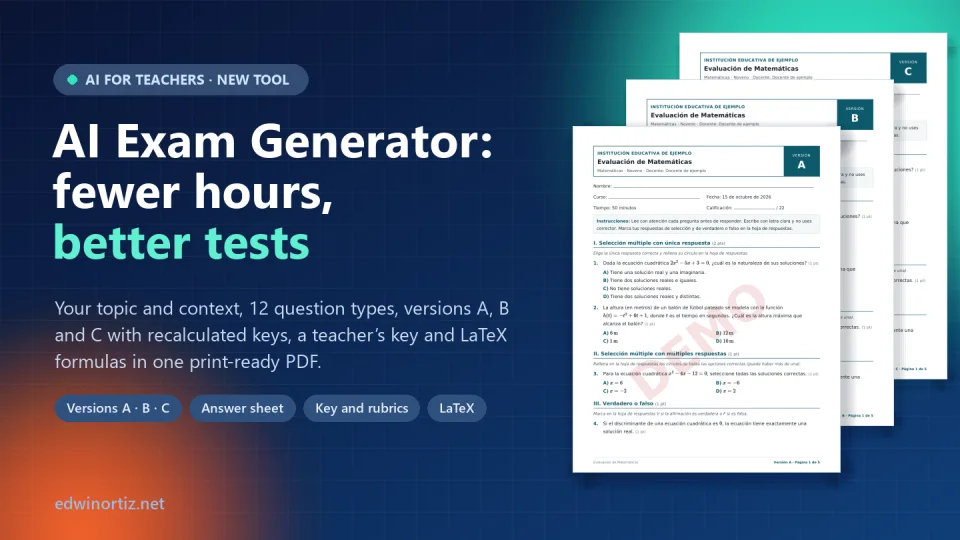
Sunday, nine p.m. End-of-term exams start on Monday and you have three grades to assess. You open last year’s file, change a few numbers, copy and paste questions from two different worksheets, fight with the equation editor so the fraction doesn’t fall out of line and, when you finally finish, you remember that in 9B half the class sits far too close together. You need another version. And its key. And the answer sheet. It is half past midnight and you still haven’t checked whether question 7 has two correct answers.
In more than twenty years teaching math and technology in Colombia I have lived that night more times than I’d like to admit. That is why I built the AI Exam Generator. But before talking about the tool, I want to talk about what really matters: what makes an exam good. A fast tool that produces bad exams doesn’t save time; it just brings the problems forward. A note before we start: the generator works in Spanish and is designed for Colombian classrooms, though the principles below apply to any teacher.
What a good exam really costs
When teachers say an exam “took forever,” they rarely mean deciding what to assess. That part, the important one, usually takes little time. The hours go into the mechanical work:
- Writing stems and options that are clear, don’t give the answer away and have believable distractors.
- Building versions for large classes, each with its own order and a recalculated key, without slipping when copying the letters.
- Layout: header, instructions, points, formulas that look right and a format that fits the paper the school actually has.
- Preparing what students never see: keys, step-by-step solutions for feedback and criteria for grading open-ended questions.
The result is familiar: since there isn’t enough time, we end up with single-version exams, recall questions and no rubric for the open items. Not for lack of pedagogical knowledge, but for lack of hours.
Five principles of an exam that actually measures
Before any tool, these are the criteria I check in every assessment, whether I write it by hand or with AI.
1. Validity: the exam measures what you taught
An exam is valid when its questions match the learning you worked on, in the proportion you worked on it. If you spent three weeks solving problems with quadratic equations and one class on their history, the exam can’t be half history. The classic tool to protect this is the test blueprint (a table of specifications): a list of which skill each question assesses, its type and its points. Few teachers make one because it takes time, yet it is the best answer when a student or parent asks, “Why was that on the test?”
2. One question, one learning goal, zero ambiguity
Each item should assess a single thing and be answerable from what it says. Questions with double negatives, those that depend on missing information or those with two defensible answers don’t measure learning: they measure the ability to guess what the teacher meant. The language must suit the grade; a 120-word stem in fifth grade assesses reading comprehension, even if the exam is about science.
3. Distractors that diagnose
In multiple choice, wrong options are not filler. A good distractor comes from a common error: the student who forgets the sign of the discriminant, who confuses mass and weight, who adds the denominators. When the distractor is well built, the wrong answer tells you what the student didn’t understand. That is why it is best to avoid “all of the above,” “none of the above” and combinations such as “a and b”: they can be guessed by elimination and diagnose nothing.
4. Different levels of thinking
Bloom’s revised taxonomy orders cognitive processes from simpler to more complex: remember, understand, apply, analyze, evaluate and create. An exam that only asks for definitions stays on the first step. A balanced one combines direct questions to check the basics, applied problems, contextualized questions that require analyzing information and at least one open question where students argue. Colombia’s national Saber tests, run by ICFES, work exactly this way: a context, a stem and options that require using what you know, not repeating it.
5. Academic honesty by design
Asking students not to copy does little if the whole class has the same exam in the same order. Academic honesty is also designed: versions with a different order, shuffled options or, better still, equivalent questions with different data. Then glancing at a neighbor’s paper stops being useful, and the exam once again measures what each student knows.
Add up these five principles and you understand why a good exam takes hours. You also understand why, when AI became accessible, many colleagues asked it for “ten fraction questions” and got wrong keys, absurd distractors and a format they had to redo. I explained this in detail in the article about the AI Kit for Teachers: the difference lies in the method, not the tool.
From principles to a tool
With those criteria in mind I designed the AI Exam Generator (in Spanish). The idea is simple: you decide what to assess and how; AI drafts the questions, and the system does all the mechanical work that doesn’t need your judgment. The process has six steps:
- Subject and grade. There are 22 options, from Math and Physics to Ethics, Art or “Other subject,” and grades from first to eleventh, plus technical and university level. The subject determines whether questions include formulas.
- Topic and scope. You write the specific topic (“Quadratic equations and the quadratic function” works better than “Algebra”) and, if you like, the context: what you covered in class, the group’s difficulties, their interests or a full text for the questions to be based on. You also choose the scope (a subtopic, a unit, the term or the year), the purpose (diagnostic, formative, summative, remedial or Saber-style mock test), the difficulty and the writing style.
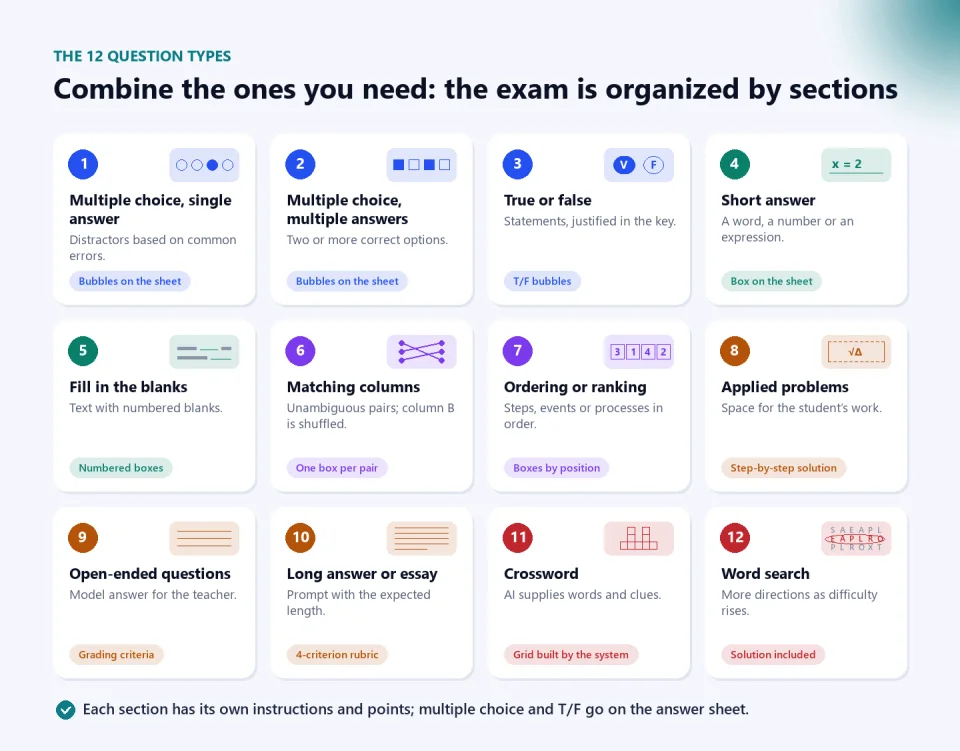
- Question types. You choose how many of each of the 12 types and whether multiple choice will have 3, 4 or 5 options.
- Versions and mode. How many versions you need and whether they will be shuffled or different.
- Header and format. School, logo, teacher, date, time allowed, instructions, paper and details such as showing points, including the answer sheet or using large print.
- Review and generate. In one to three minutes you have the exam on screen, with all its versions and the teacher’s key.
Pedagogical benefits: what your assessment gains
Questions anchored to your topic and your class
The generator doesn’t write “ninth-grade math questions”: it writes questions about the topic you entered, adapted to the context you described. If you paste the fable your class read, the comprehension questions are based on that fable. If you mention that the group loves soccer, the quadratic-function problems talk about kicked balls rather than baseball in an Ohio stadium. Behind the scenes, the AI works with the instructions of a Colombian teacher who is an assessment expert, familiar with Colombia’s Basic Competency Standards, the Basic Learning Rights (DBA), the national grading decree and the item design of the Saber tests, and it uses Colombian contexts, prices in pesos and the decimal comma.
Seven writing styles, including Saber style
You can ask for direct stems, real-life situations, a playful tone, a story that ties several questions together, a scientific context with data and tables, a mix, or the contextualized Saber style: each question starts from a situation, a short text or a table, and the wrong options are built from common errors. Difficulty can be chosen too: basic, intermediate, advanced or progressive, from easy to hard, which is my favorite for end-of-term exams because nobody freezes on the first page.
Twelve question types to assess different levels
Variety of formats is not decoration: each type engages a different process. Multiple choice and true or false quickly check the essentials; matching and ordering require understanding relationships and sequences; applied problems and open questions lead to analysis and argument; the essay makes it possible to evaluate and create. The exam is organized by sections, each with its instructions and points.
Versions that switch off copying
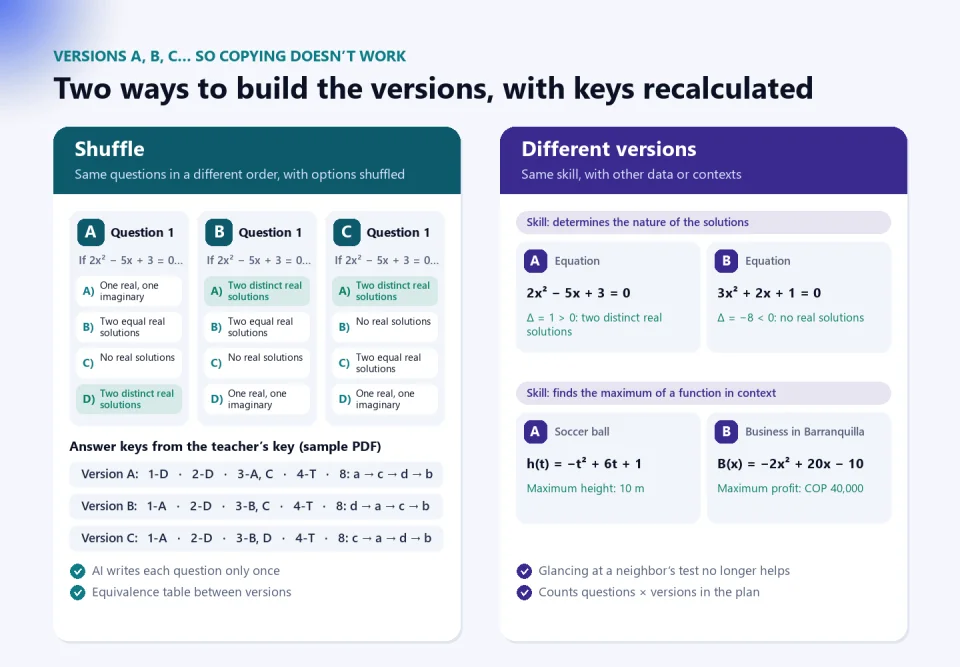
This is, for me, the benefit you notice most in a class of 40 students. The generator offers two modes. In “shuffle,” AI writes each question only once and the system creates the versions by changing the order of the questions within each section and the order of the options; the keys are recalculated automatically and the teacher’s key includes an equivalence table showing each question’s number in every version. In “different versions,” AI writes an equivalent question for each version, assessing the same skill at the same difficulty but with other numbers, another context or another example. In version A the student analyzes the discriminant of one equation; in version B, that of another with a different result. Copying becomes pointless.
A teacher’s key that also helps you teach
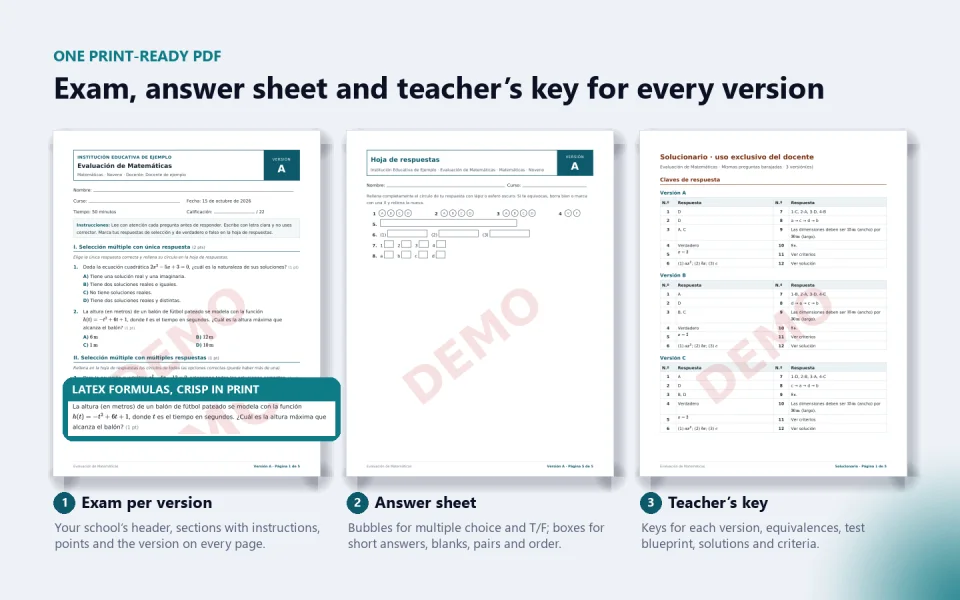
The key comes at the end of the PDF and is for the teacher only. It includes the keys for each version, the equivalences, the test blueprint with the skill each question assesses and its points, step-by-step solutions to the problems, model answers to the open questions and the criteria or rubrics for grading them. That material is worth twice as much: it saves you the work of grading fairly and gives you the feedback ready for the review class, which is where an exam turns into learning.
Technical benefits: what you no longer have to fight with
Textbook-quality formulas without knowing LaTeX
In Math, Geometry, Statistics, Calculus, Physics and Chemistry, formulas are written in LaTeX and drawn as vector graphics: fractions, roots, systems, matrices, limits, integrals, vectors, units with the Colombian decimal comma and chemical equations with states, charges and arrows. They look crisp on a phone and in print. In subjects with calculations, the AI is also instructed to verify every operation before marking the correct answer. If you edit a question, you can type your own formulas between dollar signs.
Crosswords and word searches built by an algorithm
Anyone who has asked an AI chat for a crossword knows the result is usually an impossible grid. So here AI only proposes what it does well, the words and the clues, and the system builds the grid with an algorithm that finds the crossings and generates the solution for the teacher’s key. In the word search, difficulty changes the size and the directions: at the basic level words run horizontally and vertically, intermediate adds diagonals and advanced also places them backwards.
Paper, header and a single PDF
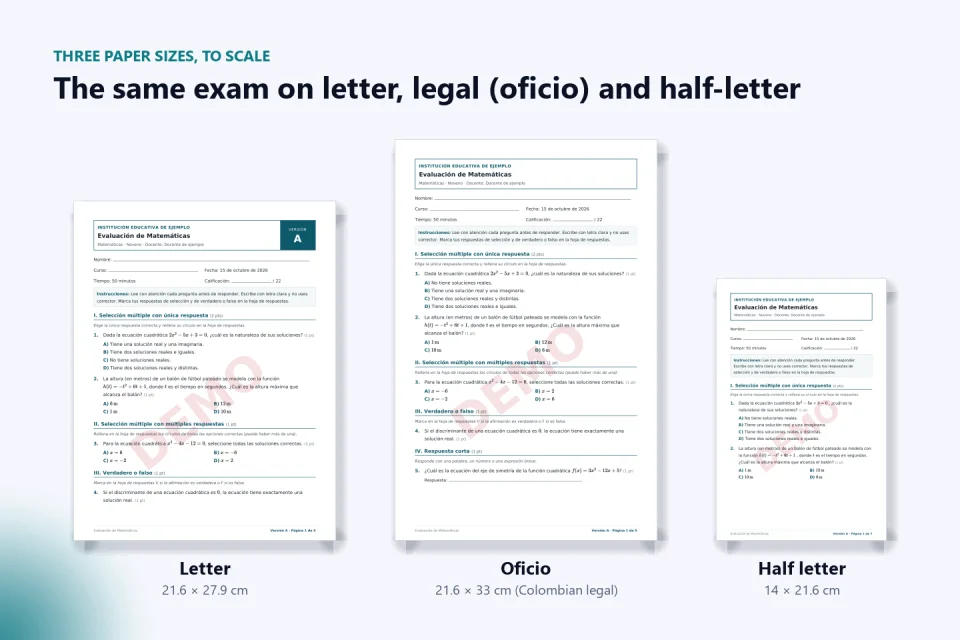
You can print on letter, on Colombian legal paper (oficio, 21.6 × 33 cm) or on half-letter, which saves half the paper for quizzes. Pagination adjusts to the content, and every page shows the version and its page number, so sheets don’t get mixed up at the photocopier. The header carries your school’s name and logo, which you upload once to your profile and is stored privately.
Everything comes out in a single PDF: for each version, the exam and its answer sheet, with bubbles for multiple choice and true or false and boxes for short answers, blanks, pairs and order; at the end, the full teacher’s key.
The time it gives back, honestly
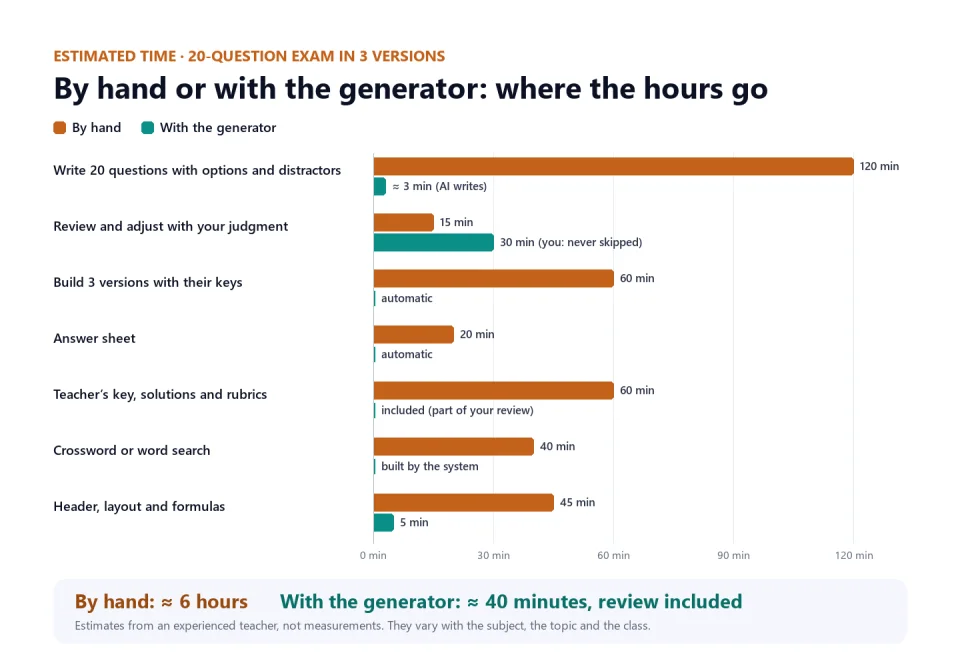
I don’t have a stopwatch in every teacher’s home, so what follows are estimates based on my experience and that of colleagues, not measurements. For a 20-question exam in three versions with a crossword, the work by hand takes around six hours. With the generator, drafting takes a few minutes and the rest is automatic, but one part grows: the review. And it should grow, because that is where your judgment comes in.
What AI doesn’t do for you
I would rather be clear: AI delivers a very solid draft, but you are the one who assesses. Before printing, review each question as you would review a colleague’s. For that, the generator has an editor where you can correct any stem, change options and points, remove what you don’t need or ask AI for additional questions or a replacement for one you don’t like, choosing the type, difficulty, style, subtopic and your own instructions. Each plan includes a quota of extra questions per exam for those adjustments.
My quick review checklist:
- Solve the calculation questions yourself without looking at the key, at least the ones worth the most points.
- Read the distractors and make sure none of them is also correct.
- Check the language through the eyes of your youngest student or the one who struggles most with reading; if you have students with individual adjustment plans (PIAR), think about the reasonable accommodations they need, as I explain in the article on inclusion in the classroom.
- Look at the test blueprint and ask yourself whether it reflects what you taught and in what proportion.
- Compare the different versions: they must be equivalent in difficulty; if one turned out easier, replace it.
A privacy note: you don’t need to enter any student data to create an exam. The context is about the topic and the class, not about individuals.
How to get the most out of it
- Be specific about the topic. “Equivalent fractions and simplification” produces better questions than “Fractions.”
- Use the context for what only you know: which examples you used, what the class struggles with and what you don’t want to appear. If you paste a text, the questions are based on it.
- Choose the mode for the moment. For a weekly quiz, “shuffle” is enough and uses less quota; for an end-of-term exam or a large class, “different versions” is worth it.
- Combine types on purpose: some closed questions for the basics, two or three problems or open questions for analysis and, in the lower grades, a crossword or word search to end on a friendly note.
- Try the Saber style in mock tests for tenth and eleventh grade: students get used to reading contexts and ruling out distractors.
- Use half-letter for short quizzes and the large-print option when the class needs it.
Try it without paying anything
The free simulator (in Spanish) uses the same form and the same assembly as the real generator: you see the versions, the answer sheet and the teacher’s key, and you download a sample PDF with the DEMO watermark, no sign-up needed. The difference is that there the questions come from a sample bank of Math, Physics, Chemistry, Spanish Language Arts and Social Studies, not from AI, so they don’t adapt to your topic. It is the best way to see what your exam will look like before deciding.
If you like it, the plans (in Spanish) last 30 days from payment, with no automatic renewal, and they stack if you buy another while one is still active. The exams you generate stay in your history, with manual editing and PDF, even after the plan expires.
AI Exam Generator. Questions on your topic and context, 12 types, shuffled or different versions, answer sheet, teacher’s key with rubrics and LaTeX formulas in one print-ready PDF. The tool and the exams are in Spanish. Essential plan: 8 exams, up to 4 versions and 24 unique questions per exam, for 29,900 Colombian pesos (USD 9.50). Teacher plan: 20 exams, up to 6 versions and 36 questions, for 74,900 pesos (USD 21.90). Institutional plan: 40 exams, up to 8 versions and 45 questions, for 159,900 pesos (USD 44.90). Each plan lasts 30 days and can be paid with Mercado Pago, Wompi or PayPal. See the plans (in Spanish).
Try the free simulator (in Spanish)
A question to close
For years we accepted that a good exam cost a whole Sunday, and so we often settled for a mediocre one. Today the mechanical part can be done in minutes. If drafting, versions and keys no longer take your night, where will you invest those hours: in assessing better, in giving better feedback or, at last, in resting?
Was this article helpful?
React and share it with someone who might find it useful.
- Like 0
- Insightful 0
- Celebrate 0
- Love 0
- Thought-provoking 0
Prefer to have it ready?
More guides in AI and technology for teachers